

This blog demonstrates how our excellent support at Patch My PC resolved the “file parameter does not exist” error, despite the root cause being caused by how EPM elevates a process in the user context.
Introduction
It all started on Reddit. An IT admin posted a question about a Win32 app that silently failed during installation. No exit code. No real error in Intune. The only clue? A PowerShell window that popped up for a second during install and showed one line: The -file parameter does not exist
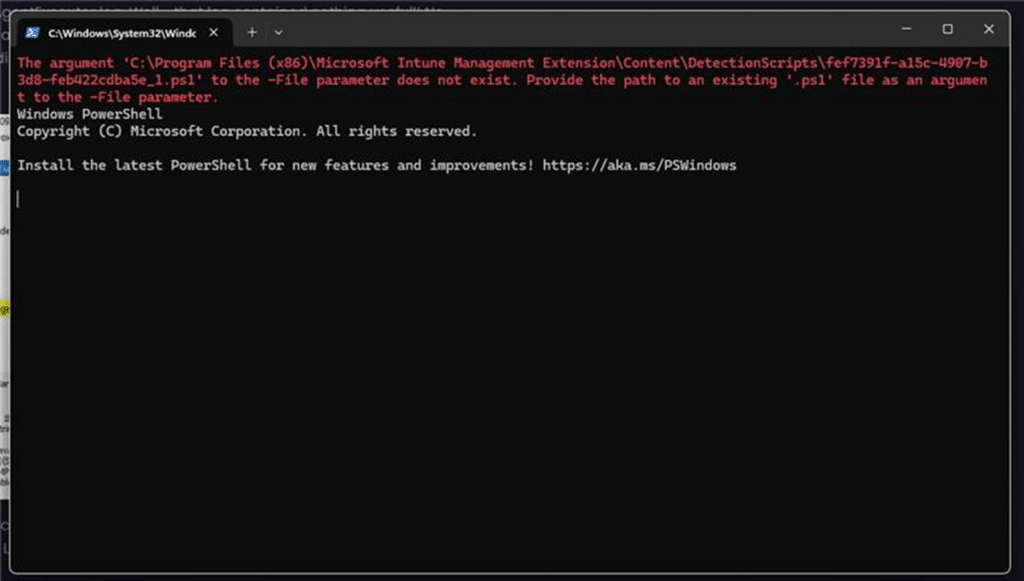
Nothing else. Just a flashing PowerShell screen, that’s it! A few hours later, the same IT admin opened a support case with Patch My PC. Same problem. Same strange pop-up. We decided (Ben Whitmore) to take a closer look.
PowerShell script is failed to execute
We started with the usual suspects. The IntuneManagementExtension log showed the app downloading and kicking off the installation without any issues. The Content was downloaded to the Incoming folder, where it was then extracted to the IMECache, ready for installation. From there on, the Agent Executor should kick off the PowerShell Script to start the installation.
The AgentExecutor.log confirmed that the PowerShell command was handed off correctly. Nothing unusual there, but then it failed out of the sudden with the error: PowerShell Script is failed to execute:

You might think I made a typo with “is failed,” but believe me, that’s not a typo on our end.
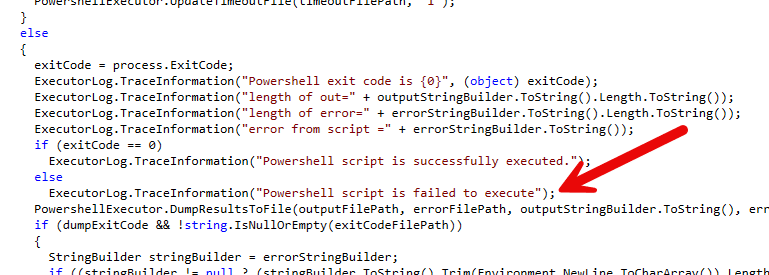
At this point, we assumed we were dealing with something simple, a missing application, a mistyped parameter, maybe a script that Defender didn’t like. But still, the IME logs gave us nothing really useful. Then we found something that changed the direction of the entire investigation.
The part that the logs didn’t tell us, but the user did
We asked the user a couple more questions…. One of them told us a bit more
“When exactly does the PowerShell window appear?”
They replied, “During install. I just saw a black box pop up with the error.” And that was the detail we needed. That PowerShell pop-up doesn’t show if the app is running in system context. If Intune launches a Win32 app under the SYSTEM account, PowerShell runs silently in the background. No windows, no UI (if you are not using PSADT), and no popups.
But this wasn’t silent. This happened inside the user session/context. Which meant IME had launched the PowerShell script as the signed-in user. We went back into the logs and confirmed it. [Proxy Poller] Launch agent executor in user session

That line told us everything. The Agent Executor wasn’t launched in the background; it was launched interactively, in session 1, right alongside the user. This install was running in the user context, and anything launched from there could be seen and, more importantly, intercepted. And once we knew that, we knew where to look next.
Something intercepted PowerShell, causing: the file parameter does not exist
When reviewing the Logs, it seemed that PowerShell was launched with the correct parameters. So, what else could prevent the PowerShell script from running without throwing any errors and leaving no trace in the logs? We asked to run a Procmon trace at the moment the app was being installed. There’s only a short list of things that can intercept and relaunch a process without the original process knowing. And one of them is Endpoint Privilege Management. (EPMService.exe)
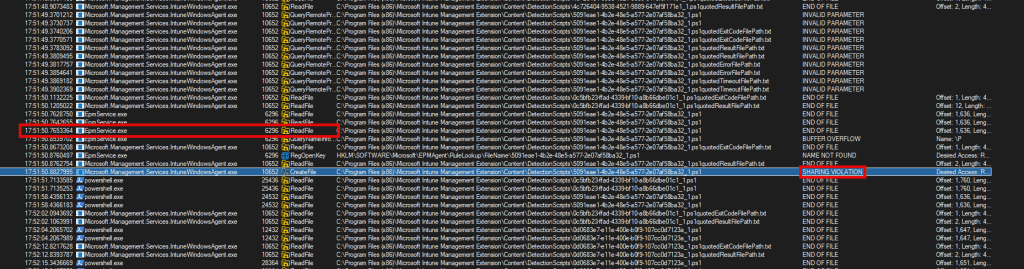
So we asked the admin a straight question: “Do you have EPM configured to elevate PowerShell?” They answered, “Yes..why?” From there on, we asked whether an EPM rule was configured to automatically elevate PowerShell. I guess the screenshot below says it all.
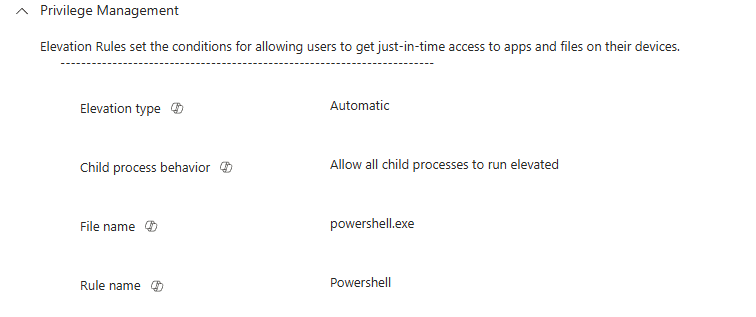
They indeed played around with EPM and created an auto-elevated PowerShell.exe rule. That was it. We had our answer.
When EPM gets involved, your process is no longer yours
Here’s what Endpoint Privilege Management does when you configure an automatic elevation rule for something like PowerShell.exe. It doesn’t just raise the token. It doesn’t add elevation in-place. Instead, it creates a completely new process, launched under a virtual administrator account.
This account is not the signed-in user. The virtual account has its own profile folder (C:\Users\UserName$). It has no Primary Refresh Token, and it doesn’t get SSO. Its HKCU hive is completely separate. And it launches in a totally different working directory than the original process. So, what happened here was precisely that.
The IME launched PowerShell in the user session. EPM intercepted it. With it, PowerShell was relaunched, silently, as the virtual account. When that happened, the working directory changed and the script path no longer existed. PowerShell had no idea where to find Install.ps1, which explains the error: the -file parameter does not exist. The new PowerShell window opened. It tried to execute the file. It couldn’t find it. And it crashed while showing the file parameter does not exist error.
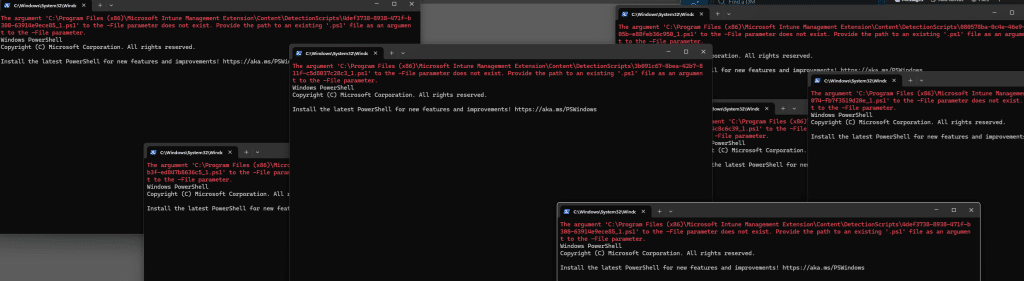
That’s what the user noticed. Not Intune. Not the logs. Just a PowerShell Window for a second, before it disappeared with the message: the -file parameter does not exist
The EPM logs confirmed the error: file parameter does not exist
To be sure, we pulled the EPM logs from the device. We didn’t have to scroll far. RetrievePolicyIdentitiesFromLookup call succeeded, entry ‘powershell.exe’, rule lookup name ‘FileName’, policies retrieved 1

CreateProcessAsUserEx: Creating suspended process – C:\Windows\System32\WindowsPowerShell\v1.0\powershell.exe

There it was. EPM noticed powershell.exe, matched the EPM Auto Elevation rule, and launched it under the virtual elevation account context. The original PowerShell process was gone. In its place was a clean, empty environment, with no idea where it came from. From here, the failure made perfect sense.
Even if the script had run… it still would’ve broken
Let’s just say the command used an absolute path. Let’s say PowerShell somehow managed to find the file and execute it anyway…. Then it still would have failed because anything the script tried to write to HKCU, %APPDATA%, or the user profile would’ve gone into the virtual account’s profile, not the actual user’s.
The detection logic wouldn’t have worked. Registry keys would have been placed in the wrong registry hive, and licensing settings might have missed the real user. The install might have looked successful, but the app wouldn’t have worked. This wasn’t just a broken path. This was a completely different user.
What fixed the file parameter does not exist error
Once we knew EPM was involved, the fix was obvious. We changed the app’s install behavior from User to System. That alone stopped EPM from getting involved. The app installed without any issues. PowerShell ran quietly, and the file executed. No black window. No popup. Everything just worked.
We also removed the automatic elevation rule for PowerShell.exe, because let’s be honest, that rule is dangerous. Giving admin rights to PowerShell is the same as giving admin rights to everything. If you want to elevate an app, elevate the app. Don’t elevate the tool that runs code.
What about the Elevation Account feature?
There’s some light at the end of this tunnel. Some time ago, I also wrote a post about a new EPM capability, called Elevate As Current User (ElevationAccount = User). It’s a new EPM feature Microsoft is working on that will allow elevated processes to keep the original user’s identity instead of switching to the EPM virtual account.
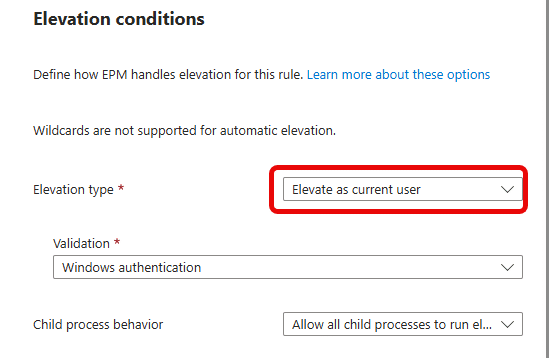
When the Elevate As Current User feature rolls out, the issue described in this blog shouldn’t occur anymore (well, that’s what we thought at first). The PowerShell detection script would have remained in the original user session, with access to the user’s profile, registry hive, and working folder. It wouldn’t have crashed, and the install would’ve worked.
So after this new EPM Elevate as Current user feature appeared, we tested it! This time the PowerShell detection script was indeed launched in the current user’s session… Which was great!!

But at the same time, we got a different error: 1008
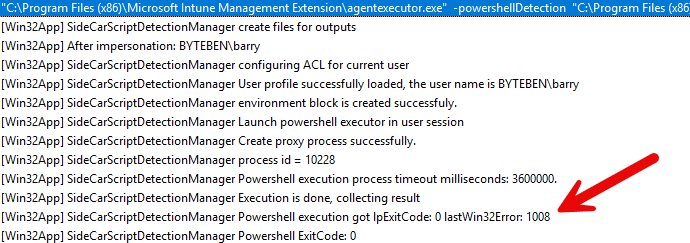
Error 1008... which resembles: ERROR_NO_TOKEN. 1008 (0x3F0). This explains a lot: a token is requested for the process we want to elevate (PowerShell), but running the same detection script after the app was installed failed because it couldn’t obtain a proper token to delete the detection script afterwards. So I guess, lesson learned. Elevating PowerShell itself still isn’t a good idea. It’s still too broad, too risky, too open-ended. If you trust an app, elevate the app. Not the scripting engine that can do everything else on the system.
Conclusion
At first, this looked like a broken detection PowerShell script. The file was there. The command was correct. The logs were clean. The only sign that something went wrong was a PowerShell window flashing on screen with the error The -file parameter does not exist
But when we looked closer, we realized something had replaced the process mid-flight. The virtual account took over the installation. And that new identity wasn’t meant to run the PowerShell script with the -file parameter at all.