
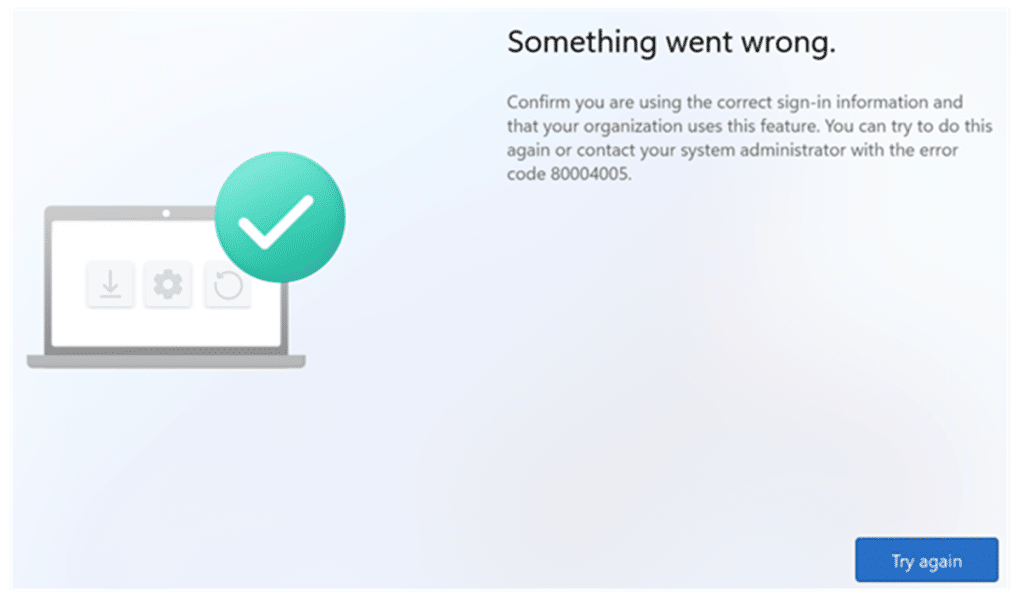
It starts with the most frustrating kind of failure. A user signs in during Autopilot, the company-branded login appears, authentication succeeds, and then Windows immediately displays the generic OOBE message: “Something went wrong with error 80004005.”
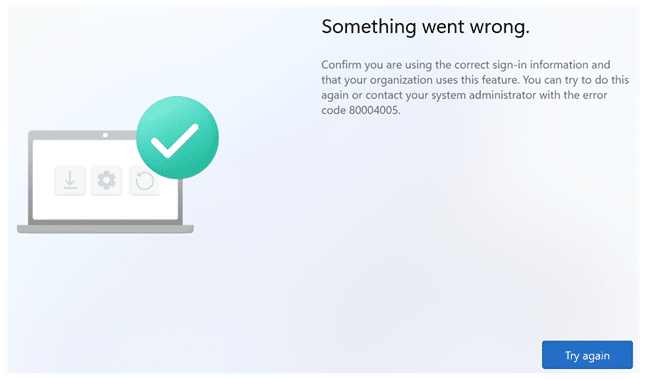
At first sight, it feels like the usual Hybrid Autopilot mess. Connector issues, ODJ blob delays, the classic “waiting for something that never arrives.” But the timing is wrong. This 80004005 error occurs right after login, before the device even appears to start doing Hybrid join work. That timing… is everything, because it tells you where to look.
Why I stopped looking at the connector
When the Intune Connector for Active Directory is the problem, Autopilot normally gets further. You see the device requesting an Offline Domain Join blob, you see it waiting, retrying, and eventually timing out. It feels slow, but at least the flow is alive.
This one isn’t. If the user can authenticate and the device immediately bails out, the connector is not part of that moment. Hybrid join has to do more than sign in, but it can only do those extra steps after the CloudExperienceHost web flow successfully completes its token handoff.
So instead of staring at the connector status, the better question became: what does Windows do in that tiny moment between “sign in succeeded” and “Autopilot continues”?
The only log you need to solve the 80004005 error: Shell Core
This Hybrid join experience runs inside CloudExperienceHost. It’s not a classic Win32 wizard. It’s a web app hosted in OOBE that calls into Windows through a bridge object. That is why you can have a perfectly healthy Intune tenant while the device still crashes locally.
When this issue occurs, Shell Core is the only place that tells you what the UI itself is doing. Open Event Viewer and go to: Applications and Services Logs\Microsoft\Windows\Shell Core\Operational
On affected devices, you’ll see CloudExperienceHost web app events pointing straight at the Hybrid join web app, OtaDJ. The three event names already tell you what is going on:
OtaDjUIWebWatsonError

OtaDJUIErrorIdTokenNotThreeParts

OtaDjUIError_crackIdToken
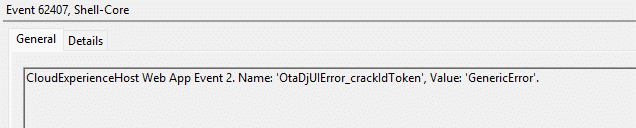
Those errors have nothing to do with the connector. They come from OtaDJ failing to handle the ID token during the Autopilot Hybrid enrollment flow.
OtaDJ: the Hybrid join web app inside OOBE
OtaDJ seems to stand for Over the Air Domain Join. This isn’t the Offline Domain Join blob itself. That comes later. OtaDJ is the Hybrid Autopilot brain inside OOBE. It sits between the Entra sign-in screen and the enrollment and domain join workflow. It takes the sign-in result, processes the tokens, determines where enrollment should go next, and then hands control to the Windows enrollment engine.
If OtaDJ cannot finish that handoff, Hybrid Autopilot cannot even begin. And that is exactly what 80004005 was masking.
The id token is the gatekeeper
The most useful Shell Core event in this case was: OtaDJUIErrorIdTokenNotThreeParts

That isn’t a vague or weird error. It’s a straight parsing failure. OtaDJ expects the id_token to be a JWT string in this format:
header.payload.signature
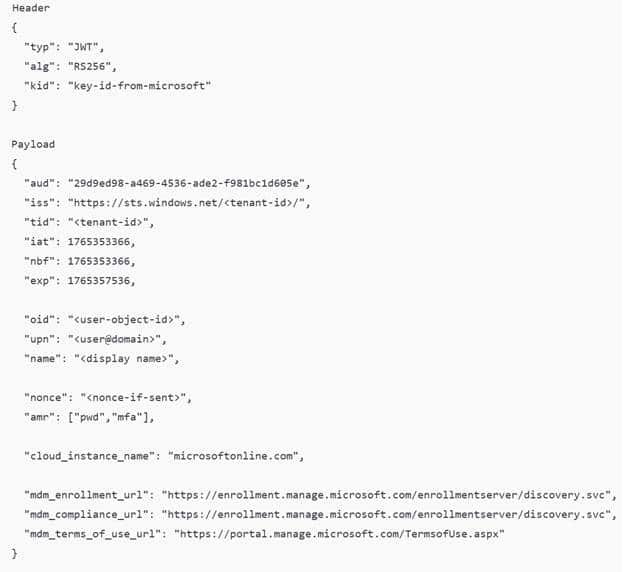
Three base64url encoded chunks are separated by dots…by dots :)… When OtaDJ can’t split the token into exactly three readable parts, it logs OtaDJUIErrorIdTokenNotThreeParts and falls back to its generic token cracking error flow. Even with three parts present, the next step is decoding the payload and running JSON.parse on it. A failure at that stage crashes the Hybrid join flow and shows the end user the 80004005 error.

So at that point, you can stop guessing. The sign-in did not fail. OtaDJ failed while processing the id token; before it could extract the data, it needed to proceed to the MDM enrollment stage.

What the OTADomainJoin Code showed us
The Shell Core event gives you all the information you need, and the best thing? The stack trace points into Microsoft’s bundled OtaDJ JavaScript.

The crash occurs during a single job: cracking the JWT and parsing its payload as JSON. It isn’t doing anything fancy. It does exactly what every JWT tutorial explains:
- Split the token on dots.
- Decode the middle chunk
- Parse it as JSON
- Read claims from it
That is why the call stack always points at the same two helper functions:
P() cracks the id token and parses the JWT payload
x() calls P() and extracts a single claim from the parsed payload
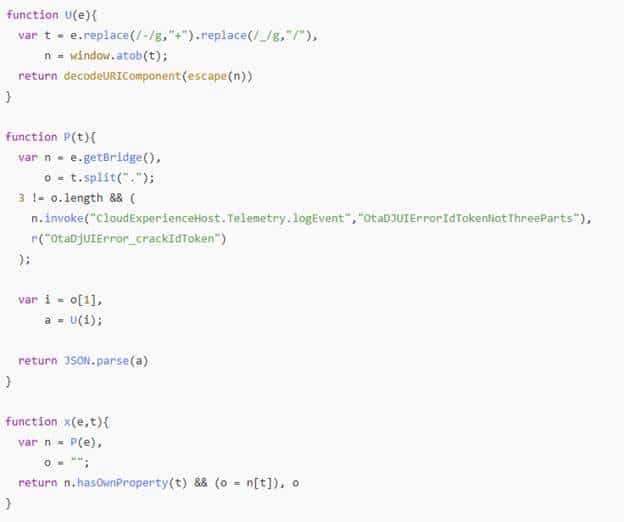
So when Shell Core shows P and x, it basically means: “OtaDJ tried to read a claim, but the token payload could not be parsed.” That is enough to crash the entire Hybrid token handoff immediately.
What it needs from the id token
This is the part that makes the failure so destructive. OtaDJ is not only using the id token for identity. It uses it to discover routing data and move to the next stage. Right after signing in, the code reads claims such as:
- cloud_instance_name
- mdm_enrollment_url
- and the user upn
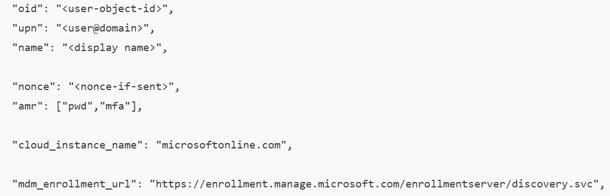
The mdm_enrollment_url claim is the key one. That is how the device learns where it should enroll next. If the token can’t be parsed, OtaDJ can’t extract the URL and can’t proceed to the MDM auth stage. So, the login succeeds, but the next step never starts. The device doesn’t even reach the “request ODJ blob” part, because it dies before enrollment routing can be built. That’s why 80004005 shows up instantly.
Why pre-provisioning didn’t show the 80004005 error
This was the detail that made everything easier to understand. In the impacted tenants, Hybrid Autopilot using pre-provisioning still worked. Devices could go through the technician flow, ESP could progress, apps could be installed, and the device could be resealed.
That proves something important. Autopilot wasn’t broken across the board. The device could still reach the service, still download the profile, and still run through a large part of provisioning. The failure was tied to one specific moment: the user-driven Hybrid handoff inside OtaDJ.
In the technician phase, the device isn’t running as the real end user yet. It uses a placeholder user context to get the job done. That’s the same “FooUser”- style behavior we’ve seen before, when explaining why pre-provisioning can still fetch MDM URLs and continue the flow without needing a real user….

That is also where device identity matters more than user identity. TPM attestation becomes a device proving itself with hardware-backed keys. Not who the user is, but what the device is. The user-driven Hybrid path is where everything changes. Right after the branded sign in, OtaDJ expects a proper id token callback and cracks it open immediately to extract routing data like the MDM enrollment URL. If that id token is malformed or truncated, OtaDJ can’t even discover where MDM enrollment should continue.
So the flow collapses before it ever reaches the Offline Domain Join blob stage. That is why pre-provisioning could still succeed, while user-driven Hybrid died instantly after sign-in. Same tenant. Same device. Different identity context. Different dependency.
Microsoft confirmed the core issue of 80004005
Microsoft eventually published an incident stating that an authentication token leveraged during Windows Autopilot Hybrid Entra join enrollment was malformed, and that a fix was being validated before release.
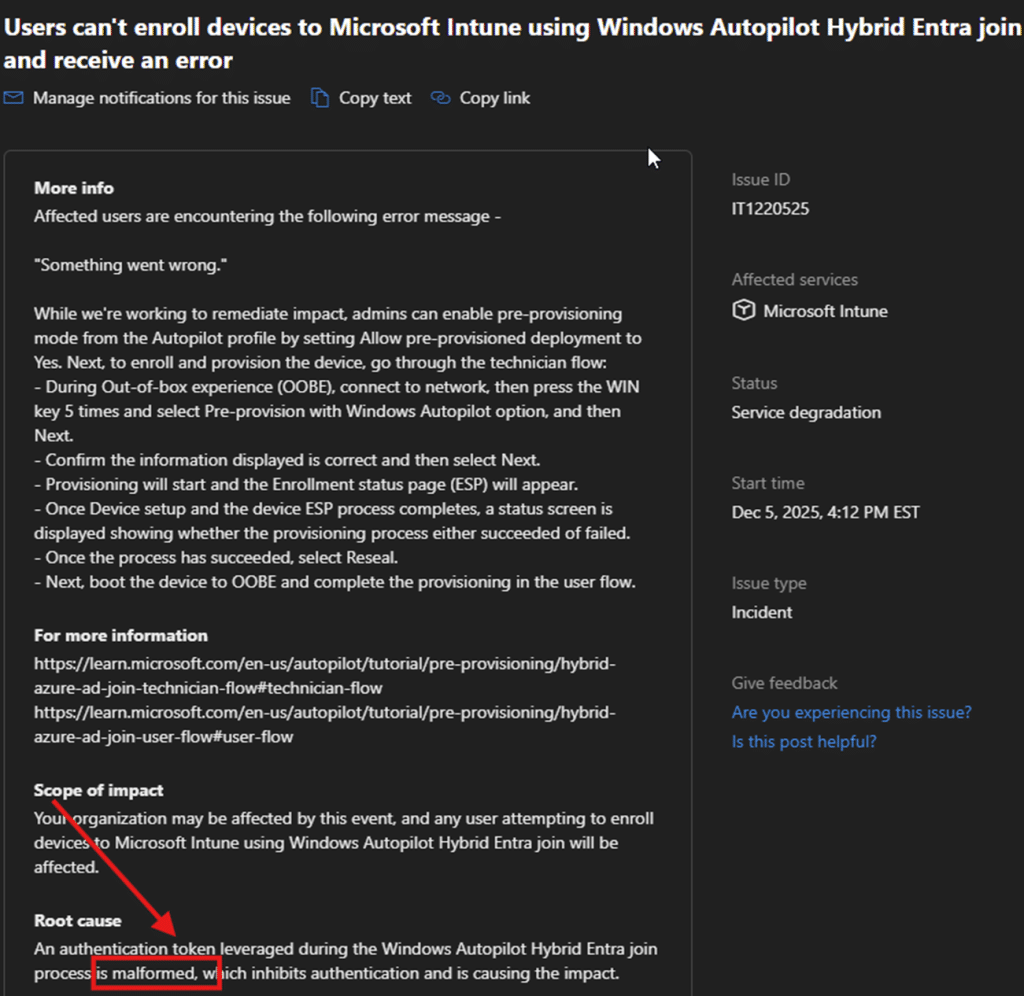
That matched exactly what the Shell Core evidence was already showing. It was the OtaDJ token chain (id_token) breaking right after login.
It also suggests something else. If the incident start time predates the day most admins noticed it, then this issue likely existed in the background for a while, surfacing intermittently, until it became widespread enough to be acknowledged as a service degradation.
Conclusion
Next time you run into a weird Autopilot failure that happens right after sign in, don’t start with the connector. Start with the Shell Core Operational event log.
That’s where this one became obvious. The sign in succeeded, but during Hybrid Autopilot the OtaDJ UI crashed because the id_token wasn’t a valid JWT. Either it didn’t contain the required three dot separated parts, or the payload couldn’t be parsed. And once that token can’t be processed, OtaDJ can’t pull the routing data it needs, like the MDM enrollment URL, so the whole flow dies instantly with 80004005.