Knowledge Base Articles
Get expert insights, how-to guides, product updates, and best practices for streamlining patch management, improving endpoint security, and optimizing IT operations.

Learn how to prepare an offline package for SQL Server Management Studio (SSMS) 22 and deploy it as a Custom App using Patch My PC Cloud or publish it as a Custom App using Patch My PC Publisher.



Why the Edge ARM64 update can show Installed on x64 devices in Intune, and the recommended filter workaround
Understand Patch My PC’s support scope for External apps, including WinGet apps, in Patch My PC Cloud
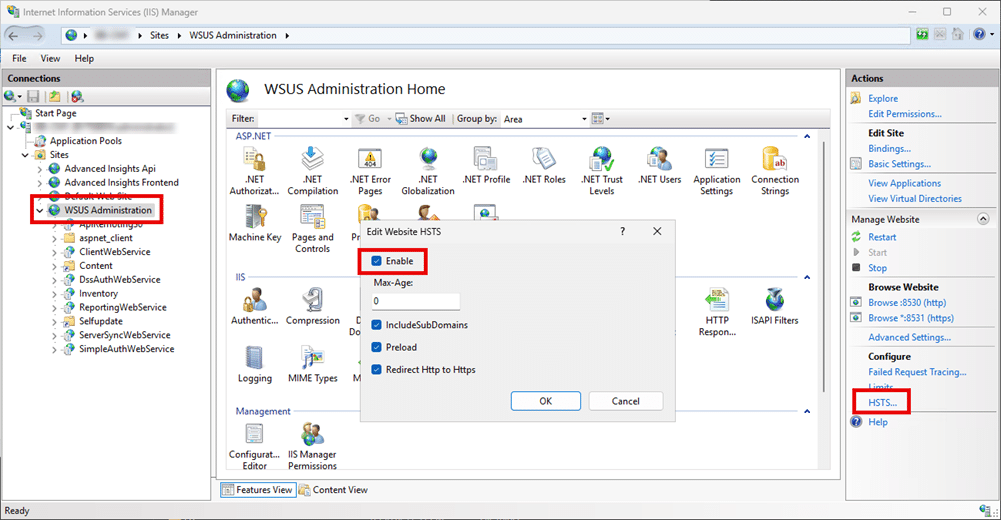
WSUS content URLs may redirect from HTTP port 8530 to HTTPS port 443 when HSTS is enabled or cached for the WSUS host name. This article explains the symptoms, cause, verification steps, and how to clear cached HSTS state on affected clients.
Learn how to package Microsoft 365 Apps as a Custom App for Patch My PC Cloud, including guidance on configuration planning and deployment considerations.
This article explains the supported Foxit PDF Editor and Reader versions in the Patch My PC catalog, including product removals, renamed products, replacement guidance, and deployment recommendations.

Patch My PC has migrated application icons, scripts, and other package assets to a new hosting location. If content.patchmypc.com is not allowed through your firewall, you may see missing icons or package build failures. Learn what changed, required firewall rules, and how to republish affected apps.