
This article discusses the “Windows Server Update Services is not installed” error message you get when installing the Patch My PC Publisher.
Introduction
When you install the Patch My PC Publisher on a Windows 10 / 11 / Windows Server, you get the error message “Windows Server Update Services is not installed”.
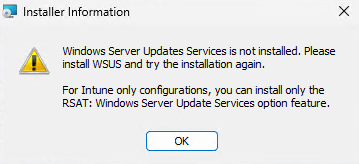
Even for the Intune-only integration, the Patch My PC Publisher can only be installed if the WSUS RSAT tools are installed. These tools are needed to be installed to parse the Patch My PC catalog XML.
You can find more details on necessary requirements on this page.
How to fix it
If you are installing the Patch My PC Publisher on a Windows OS, you’ll need to install the WSUS RSAT tools to fix this issue.
Note: You can only install the WSUS RSAT tools on Pro or Enterprise Operating Systems.
Warning: The WSUS RSAT tools cannot be installed on ARM devices.
If you plan on installing the Publisher on a Windows Server OS, you’ll need to install the UpdateServices-API.
Note: It’s not mandatory to install the full WSUS role, the API is sufficient.
How to fix the issue on Windows 10 and Windows 11 OS
To install the WSUS RSAT tool on a Windows Desktop machine, please follow these steps:
- Open an elevated PowerShell window.
- Enter this command:
Add-WindowsCapability -Online -Name Rsat.WSUS.Tools~~~~0.0.1.0
You can verify if this capability installed successfully by running the following PowerShell command.
Get-WindowsCapability -Online -Name Rsat.WSUS.Tools~~~~0.0.1.0
You should get a result similar to this:

How to fix the issue on a Windows Server OS
If you plan hosting the Patch My PC Publisher on a Windows Server, please follow these steps to install the UpdateServices API:
- Open an elevated PowerShell window.
- Enter this command:
Install-WindowsFeature UpdateServices-API
- You can verify if this feature installed successfully by running the following PowerShell command:
Get-WindowsFeature UpdateServices-API
You should get a result similar to this:
