
This knowledge base article provides an overview of the various features of Patch My PC and their interactions with external APIs, including Microsoft Graph API and Patch My PC’s own API. The article details specific actions taken by each feature, associated endpoints, and required permissions.
Note 1: Some URLs in this article might differ depending on your geographical location, for example Azure Storage endpoints. For a full list of endpoints required for Patch My PC Publisher, please refer to https://patchmypc.com/list-of-domains-used-for-downloads-in-patch-my-pc-update-catalog
Note 2: A spreadsheet containg the references in this KB can be found at https://patchmypc.com/app/uploads/2025/06/Publisher-Graph-Endpoints-and-API-Permissions-for-Intune.xlsx
API Permision Reference
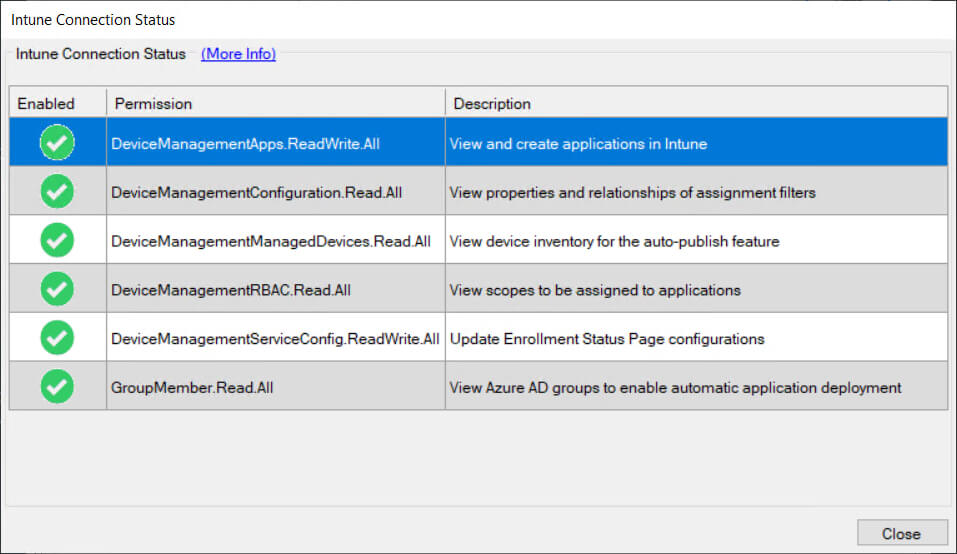
DeviceManagementApps.ReadWrite.All
Reason(s):
- List and Manage Applications
This permission allows Patch My PC to query and list Win32 applications in your Intune tenant, manage applications, and perform actions such as creating or deleting assignments. - Add or Update Applications
Required for adding new Win32 applications, updating them with new content versions, or deleting them when they fall outside of the retention chain specified by the publisher. - Batch Operations
Enables performing batch requests such as deleting multiple Win32 applications in bulk or assigning multiple applications at once. - Upload Application Content
Necessary to obtain a storage URI from Intune for uploading content for new or updated applications. - Assignment Management
Used when adding or removing application assignments or managing the group assignments related to applications.
DeviceManagementConfiguration.Read.All
Reason(s):
- Retrieve Assignment Filters
This permission allows Patch My PC to read assignment filters from Intune, which are used to target specific devices or users when deploying or updating applications.
DeviceManagementManagedDevices.Read.All
Reason(s):
- Request and Download Reports
This permission allows Patch My PC to request reports for discovered applications (AppInvRawData) and poll the service to check if the report is ready. - Display Discovered Apps
It enables Patch My PC to download and display generated reports that contain details of managed devices in your Intune environment. - Enumerate Groups for Assignments
Necessary for querying the Intune device inventory and retrieving device data to support application assignment and other management operations.
DeviceManagementRBAC.Read.All
Reason(s):
- Role Scope Tag Management
This permission is needed to retrieve and manage role scope tags, ensuring that administrative roles and permissions are applied consistently across application assignments, device configurations, and user roles. It helps restrict certain actions based on role-based access control (RBAC) policies.
DeviceManagementServiceConfig.ReadWrite.All
Reason(s):
- ESP Profile Management
Required for Patch My PC to update and manage Enrollment Status Page (ESP) profiles, ensuring that newly added Win32 applications are correctly flagged as blocking apps during device provisioning.
GroupMember.Read.All
Reason(s):
- Populate Groups for Assignments
This permission allows Patch My PC to read Entra ID group information when creating or managing application assignments. It fetches group data for assignment targeting and filtering, ensuring that only authorized users or devices receive the intended applications.
API Reference
Supported Products and Catalog Download
- Product: Publisher
- Tab: General
- Feature: Licence validation
- Button/Option: Validate
- Endpoint(s):
- Method: CONNECT
- Graph API Permission: None
Licence Validation/Telemetry
- Product: Publisher
- Tab: General
- Feature: Licence validation
- Button/Option: Validate
- Endpoint(s):
- Method: CONNECT
- Graph API Permission: None
Oauth Assertion / Get App Registration Permissions
- Product: Publisher
- Tab: Intune Apps
- Feature: Options
- Button/Option: Test
- Endpoint(s):
- https://login.microsoftonline.com/<>.onmicrosoft.com/oauth2/v2.0/token
- Method: POST
- Graph API Permission: None
MSAL Token Request
- Product: Publisher
- Tab: Intune Apps/Updates
- Feature: Scan for supported products
- Button/Option: Query
- Endpoint(s):
- Method: GET
- Graph API Permission: None
Request Report for Discovered Apps (AppInvRawData)
- Product: Publisher
- Tab: Intune Apps/Updates
- Feature: Scan for supported products
- Button/Option: Query
- Endpoint(s):
- Method: POST
- Graph API Permission: DeviceManagementManagedDevices.Read.All
Poll the Service to See if the Report is Ready
- Product: Publisher
- Tab: Intune Apps/Updates
- Feature: Scan for supported products
- Button/Option: Query
- Endpoint(s):
- Method: GET
- Graph API Permission: DeviceManagementManagedDevices.Read.All
Download the Generated Report to Display Discovered Apps
- Product: Publisher
- Tab: Intune Apps/Updates
- Feature: Scan for supported products
- Button/Option: Query
- Endpoint(s):
- Method: GET
- Graph API Permission: DeviceManagementManagedDevices.Read.All
List Win32 Apps in the Intune Tenant (Paginated)
- Product: Publisher
- Tab: Intune Apps/Updates
- Feature: Intune application manager
- Button/Option: Query
- Endpoint(s):
- Method: GET
- Graph API Permission: DeviceManagementApps.ReadWrite.All
AppInstallStatusAggregate Report is Returned after Querying the List Win32 Apps in the Intune Tenant
- Product: Publisher
- Tab: Intune Apps/Updates
- Feature: Intune application manager
- Button/Option: Query
- Endpoint(s):
- Method: GET
- Graph API Permission: DeviceManagementApps.ReadWrite.All
Assignment(s) Deleted from Win32 App(s)
- Product: Publisher
- Tab: Intune Apps/Updates
- Feature: Intune application manager
- Button/Option: Delete Assignment
- Endpoint(s):
- Method: DELETE
- Graph API Permission: DeviceManagementApps.ReadWrite.All
Batch DELETE Request Posted to Intune to Delete Application(s)
- Product: Publisher
- Tab: Intune Apps/Updates
- Feature: Intune application manager
- Button/Option: Delete Application
- Endpoint(s):
- Method: POST
- Graph API Permission: DeviceManagementApps.ReadWrite.All
Groups Returned to Populate EntraID Group Form (Top 99 or Filtered Results)
- Product: Publisher
- Tab: Intune Apps/Updates
- Feature: Assignments
- Button/Option: Add assignment
- Endpoint(s):
- Method: GET
- Graph API Permission: GroupMember.Read.All
Supported Products, Catalog, and Application Icon Download(s)
- Product: Publisher
- Tab: Sync Schedule
- Feature: Sync
- Button/Option: Run Publishing Service Sync
- Endpoint(s):
- Method: CONNECT
- Graph API Permission: None
Licence Validation/Telemetry (Sync)
- Product: Publisher
- Tab: Sync Schedule
- Feature: Sync
- Button/Option: Run Publishing Service Sync
- Endpoint(s):
- Method: CONNECT
- Graph API Permission: None
MSAL Token Request (Sync)
- Product: Publisher
- Tab: Sync Schedule
- Feature: Sync
- Button/Option: Run Publishing Service Sync
- Endpoint(s):
- Method: GET
- Graph API Permission: None
Oauth Assertion / Get App Registration Permissions (Sync)
- Product: Publisher
- Tab: Sync Schedule
- Feature: Sync
- Button/Option: Run Publishing Service Sync
- Endpoint(s):
- https://login.microsoftonline.com/<>.onmicrosoft.com/oauth2/v2.0/token
- Method: POST
- Graph API Permission: None
Enumerate Groups for Assignment(s) for New/Updated Application(s)
- Product: Publisher
- Tab: Sync Schedule
- Feature: Sync
- Button/Option: Run Publishing Service Sync
- Endpoint(s):
- Method: GET
- Graph API Permission: DeviceManagementApps.ReadWrite.All
Create New Win32 Application(s)
- Product: Publisher
- Tab: Sync Schedule
- Feature: Sync
- Button/Option: Run Publishing Service Sync
- Endpoint(s):
- Method: POST
- Graph API Permission: DeviceManagementApps.ReadWrite.All
Obtain Storage URI from New Win32 Application Request to Prepare for Intunewin Content Upload
- Product: Publisher
- Tab: Sync Schedule
- Feature: Sync
- Button/Option: Run Publishing Service Sync
- Endpoint(s):
- Method: CONNECT
- Graph API Permission: DeviceManagementApps.ReadWrite.All
Add File Encryption Information to New Win32 Application(s)
- Product: Publisher
- Tab: Sync Schedule
- Feature: Sync
- Button/Option: Run Publishing Service Sync
- Endpoint(s):
- Method: POST
- Graph API Permission: DeviceManagementApps.ReadWrite.All
Update Win32 Application(s) with New Content Version
- Product: Publisher
- Tab: Sync Schedule
- Feature: Sync
- Button/Option: Run Publishing Service Sync
- Endpoint(s):
- Method: PATCH
- Graph API Permission: DeviceManagementApps.ReadWrite.All
Delete Any Win32 Application That Falls Outside of the Retention Chain
- Product: Publisher
- Tab: Sync Schedule
- Feature: Sync
- Button/Option: Run Publishing Service Sync
- Endpoint(s):
- Method: DELETE
- Graph API Permission: DeviceManagementApps.ReadWrite.All
Update ESP Profiles in Intune to Add Win32 Application(s) as Blocking App(s)
- Product: Publisher
- Tab: Sync Schedule
- Feature: Sync
- Button/Option: Run Publishing Service Sync
- Endpoint(s):
- Method: POST
- Graph API Permission: DeviceManagementServiceConfig.ReadWrite.All
Test Connection (Cloud)
- Product: Publisher
- Tab: Cloud
- Feature: Test Connection
- Button/Option: Test Connection
- Endpoint(s):
- Method: CONNECT
- Graph API Permission: None
Custom App List Downloaded
- Product: Publisher
- Tab: Intune Apps/Updates
- Feature: Refresh the list of products
- Button/Option: Refresh the list of products
- Endpoint(s):
- Method: CONNECT
- Graph API Permission: None
Get ESP Profiles from Intune
- Product: Publisher
- Tab: Intune Apps/Updates
- Feature: Manage ESP Profiles
- Button/Option: Manage ESP Profiles
- Endpoint(s):
- Method: GET
- Graph API Permission: DeviceManagementServiceConfig.ReadWrite.All
Get Filters from Intune
- Product: Publisher
- Tab: Intune Apps/Updates
- Feature: Assignments
- Button/Option: Add assignment
- Endpoint(s):
- Method: GET
- Graph API Permission: DeviceManagementConfiguration.Read.All
A Get Scope Tags from Intune
- Product: Publisher
- Tab: Intune Apps/Updates
- Feature: Product customization
- Button/Option: Manage Role scope tags
- Endpoint(s):
- Method: GET
- Graph API Permission: DeviceManagementRBAC.Read.All