We do not have an option for auto-renewal at this time. Once a subscription has been purchased, you will begin to receive renewal notifications 90 days prior to expiration providing you with an option to easily request a renewal quote.
Archives
Why Do Subscriptions Have a Minimum Starting Price (with breakdown)?
All subscription levels have a yearly minimum price, as shown below. Included in our minimum starting price is coverage of up to 1,000 devices.
- Minimum Yearly Price (Enterprise Premium) = $5,000
- Minimum Yearly Price (Enterprise Plus) = $3,500
- Minimum Yearly Price (Enterprise Patch) = $2,000
We price our software subscription per-device cost very competitively, and we believe our minimum starting price is priced appropriately for the value and time savings. Please see Why is There a Minimum Price for Companies with Low Device Counts? for a more detailed look.
Here is a quick breakdown of everything that comes with the minimum pricing:
- Average Savings of More than 5000 Hours
- Regardless of device count, an average customer publishes 1,329 updates and applications per year. It takes about 4.5 hours to package, test, and deploy an application manually (Twitter survey). The base pricing ensures both small and large companies get maximum time-saving.
- Unlimited Support
- No need to sign up for premium support upgrades. The minimum pricing includes unlimited, in-house support from our top-tier engineers worldwide, who provide complete time zone coverage. This helps us provide seamless experiences for all customers.
- One-on-One Live Demo with an Engineer
- Whether you want to see our product in action or you have questions about our process, an engineer will present a live demo for you. In this demo, you can learn about product installation, creating third-part applications, publishing and deploying updates, reviewing dashboards, and troubleshooting.
- One-on-One Setup Calls with an Engineer
- Our engineering team will help you with the initial setup. This includes product installation, publishing and deploying third-party updates, creating and deploying applications, Microsoft Intune integration, and install compliance reports
- One-on-One Environment Review and Q&A Calls
- For the existing setup, our team will review your setup and answer all your questions. This service includes a review of installation and customization. They will help you with Automatic Deployment Rule creation and install compliance reports.
What are the Available Purchase and Payment Methods?
Purchasing Directly Online:
- Bank Transfer (ACH transfer)
- American Express
- Discover
- MasterCard
- Visa
Purchasing Using Purchase Order:
- Bank Check
- Bank Transfer – (Wire/ACH transfer)
- American Express
- Discover
- MasterCard
- Visa
Payment Terms?
We use net-30 terms for any invoices unless otherwise agreed upon prior to receiving a purchase order.
Is There a Money-Back Guarantee with a Full Refund?
Absolutely, if you don’t love the experience, we offer a full money-back guarantee for up to 180-days after purchasing.
How is Device Count to Purchase Determined?
You know your environment better than us. We use the honor system for allowing you to determine your managed device count when requesting a quote.
If you plan to deploy third-party updates to all managed devices, using the All Desktop and Server Clients member count would be a good option for ConfigMgr customers. For Intune Customers, we recommend the Windows Intune enrolled devices table from the Devices Overview page.
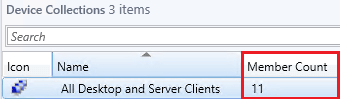
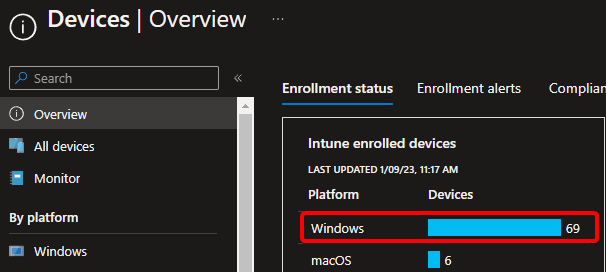
You can exclude machines where third-party updates will not be deployed, such as Mac OS devices and other machines you want to exclude from your third-party update deployment collections. For more details about excluding please see Can I exclude devices?
How are Notifications Sent Out for Subscription Renewal Reminders?
We will send our renewal and expiration notifications out to the primary contact(s) on the subscription at the following intervals:
- 90 Days Before Expiration
- 75 Days Before Expiration
- 60 Days Before Expiration
- 45 Days Before Expiration
- 30 Days Before Expiration
- 15 Days Before Expiration
- 5 Days Before Expiration
- 1 Day Before Expiration
- 1 Day After Expiration – Expiration Notification
If you aren’t sure the contacts associated with your account or need to add additional employees for the renewal notifications, please use our Contact Us Form.
Can I Use the Same Catalog Subscription in Multiple Environments?
Yes, you can use the same catalog subscription in multiple locations or environments within the same organization as long as the client count for all sites is factored into the initial purchase.
For example, you could use the same catalog subscription in:
- Development environment
- Quality assurance environments
- Production environments
- Environments to separate servers and workstations
- Multiple subsidiaries under the same parent company
- Multiple environments, Azure tenants, or domains in the same company
If you are a consultant managing multiple different customer environments, you need to purchase a separate subscription for each customer environment.
Can I Upgrade My Existing Subscription During the Middle of the Subscription Term?
Yes, you can always upgrade your subscription to a higher subscription-level. The cost would be pro-rated based on the length remaining on your existing subscription.
We do not offer a refund if you ever wanted to downgrade for an existing subscription term.
Does Patch My PC Have Any Competitor Comparison Details?
Patch My PC Doesn’t Offer Competitor Comparison and Here’s Why
We don’t offer a direct comparison that we create. As a company, we don’t think spending time researching, comparing, or copying competitors makes sense when we have over 7,520 customers using our product and providing fantastic feedback daily on our UserVoice. We use this feedback directly when adding new features to our product Public Roadmap. We build our product based on customer feedback. This philosophy is how our customers differentiate us when they switch to our product from our competitors.
If you want a comparison, I would recommend starting with a live demo and full-access free trial and compare the experience. If you have any specific questions, feel free to book a 30-minute call with me! – Justin Chalfant, Founder/CEO
You can read Customer Reviews on Gartner, G2, and Capterra
You can review our Gartner, G2 and Capterra customer reviews and competitor comparisons:
- Patch My PC Vs. Ivanti (Gartner)
- Patch My PC vs. ManageEngine (Gartner)
- Patch My PC Vs. Ivanti (G2)
- Patch My PC vs. ManageEngine (G2)
You can also Check Discussions on Reddit r/SCCM
- Reddit – Are You Using Patch My PC? Would You Recommend It?
- Reddit – Comparison matrix for third party patching tools
- Reddit – Thoughts and Experiences on Ivanti
- Reddit – Ivanti – 3rd Party Patch Management Thoughts?
- Reddit – Evaluation Update/Patchmanagement-Solutions



Can I Exclude Devices that I Won’t Deploy Third-Party Updates to from My Licensed Device Count?
Yes, you can exclude devices. If you have a scenario where you know you won’t deploy third-party updates to certain devices, departments, divisions, etc. those endpoints can be excluded from your licensed device count.
We ask that you calculate your device count based on the devices that will receive third party updates to the best of your ability.
A few examples of excluding devices could be:
- Linux devices
- Excluding servers, if they will not receive third third-party software updates or application from our service.
- Mission-critical devices that can’t receive third-party updates or applications.
- Excluding departments that aren’t applicable
- Mac devices