Home Updater
As of August 19, 2025, Home Updater Version 4 is officially deprecated. This means:
- All users on Version 4 will be automatically upgraded to Version 5.
- Version 4 will no longer receive updates, security patches, or support.
- If you were still running the portable build of v4, it will be replaced by the MSI-based Version 5 going forward.
- Important: Users on 32-bit Windows OS will not be auto-migrated, since Version 5 is only supported on 64-bit Windows. Because we will no longer maintain the catalog for Version 4 or provide updates, we recommend upgrading to a supported Microsoft Windows OS to continue receiving updates and support.
Yes, you can enable the beta updates in Settings > Technical Options > Use the beta channel when checking for Patch My PC Updates.
You also download the latest beta version directly at:
No, the Home Updater is provided for free and is restricted to non-commercial use only.
Please review Section 7 of our Terms of Service in the Home Updater installer for more details; the Home Updater is intended for consumer use only.
For business purposes, please explore our commercial solutions.
To report a bug:
- Create an account on our Support Forum
- Create a new topic on our Bug Board
To request a new feature for Home Updater:
Check if it has already been requested on our ideas portal. If not, add a new idea on the portal and choose the category “Home Updater (Features).”
To request a new app for Home Updater:
Check if it has already been requested on our ideas portal. If not, add a new idea on the portal and choose the category “Home Updater (Apps).“
Yes! We now offer a portable version of Patch My PC Home Updater.
You can download it directly here: https://homeupdater.patchmypc.com/public/PatchMyPC-HomeUpdater-Portable.exe
This version doesn’t require installation and is perfect for running on-demand from a USB drive or other devices.
Patch My PC Updater can do both. You can install new applications by going to the App Library, selecting the app you want, and checking the box next to it. Even if the app isn’t currently installed, Patch My PC will install it for you.
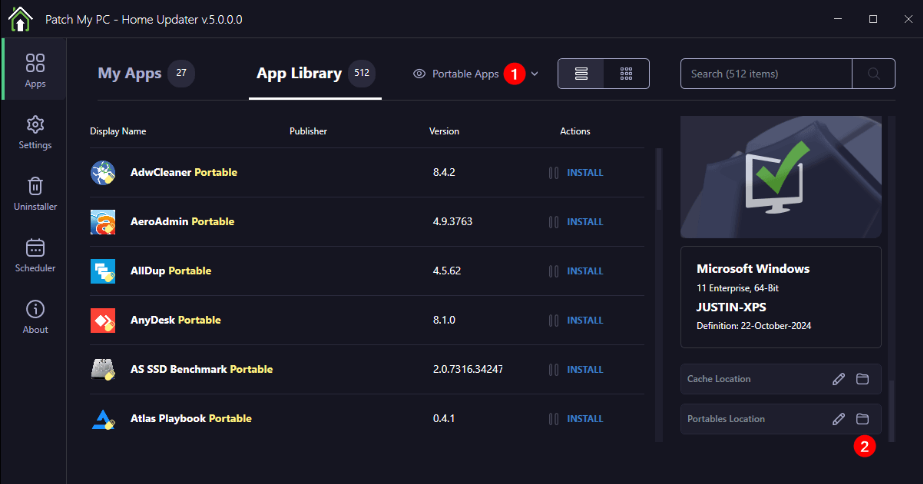
A portable app in the Home Updater is an application that doesn’t actually install on your PC. Instead, portable apps download into the folder you select in the “Portables Location” as shown in the screenshot below.
Portable apps will download as an EXE or ZIP file directly. We will only detect and update portable apps that were originally downloaded through the Home Updater.