

This deep dive builds on earlier research in which we observed that Intune remote actions feel instant on day one but begin to show a delay the next day. That research focused on the behavior from the outside.
In this blog, we go deeper and examine what changed inside the OMA-DM client, why the delay started to appear, and how the February 2026 update (24h2/25h2 only) removed the five-minute delay, effectively making Intune remote actions instant (aka fast) again.
Introduction to Intune Device Actions
A long time ago, executing Remote Intune Device Actions (Sync/Wipe/EPM Support Approved) behaved in a very direct and predictable way. When an admin pressed the Sync button or changed a policy assignment, the device received the push notification. From there on, the OMA-DM client woke up, and the management session started immediately.
The push notification itself contains no instructions and does not describe what has changed. It is simply a wake-up signal that tells the device something might have changed and that it should contact the service to retrieve the latest policies and settings. Even though the push carried no explicit intent, the OMA-DM client consistently treated it as a critical message. Why? Because it was classified that way, the session bypassed any deferred-execution logic and was executed immediately.

That behavior made Device Actions feel fast, responsive, and pretty reliable in the past (a couple of years back). The device did not wait, nothing was placed into a queue, and the OMA-DM session was launched as soon as the push notification arrived. Pressing the Device Action: Sync effectively meant “run now,” and for years that model stayed intact.
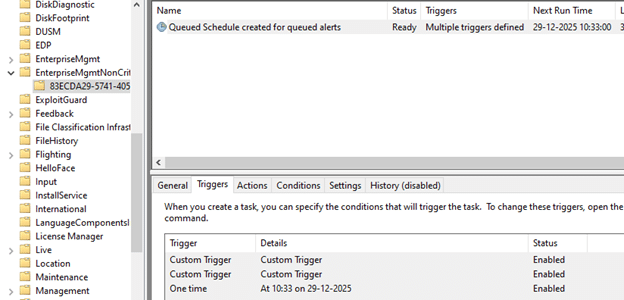
At some point, however, that instant behavior changed. The same push notification still arrived, and the device still received the signal, but the session no longer started immediately. Instead of launching right away, the request was deferred and scheduled to run the real check-in later (5 minutes).
A 5 minute Delay Appeared After performing a Device Action from Intune
With it, a 5-minute delay window appeared, and devices suddenly seemed idle even though the push notification had clearly been delivered.
From the outside, the behavior looked unreliable or inconsistent. From the inside, it was the result of an architectural change in how the push message was classified and executed. The rest of this story follows that transition:
How the original behavior worked. What changed inside the OMA-DM code path, how that unexpectedly affected Intune scenarios such as EPM Support Approved, and how Microsoft now introduced a dedicated bypass to restore instant execution for remote push-initiated sessions. Even though that bypass still remains gated behind a servicing feature flag today. (AKA you need the 2026-02 update)
Phase One: When the Device Action Message Was Always Critical
When reviewing the older OMA-DM code, push-initiated sessions (Remote Intune Device Actions) were always treated as critical operations. The classification within IsCriticalMsg ensured that a push notification from Intune was immediately triggered rather than queued or delayed.

When the push notification arrived, the client woke up, OmaDmInitiateSession_Internal was invoked, and the OMADM session began right away.
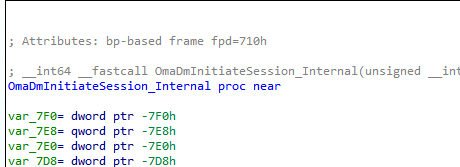
No queueing, no scheduling logic, and with it, no waiting period. The sync execution was pretty instant. This critical classification mattered because the client had no insight into the meaning of the push notification itself. The push did not reveal whether it was related to a configuration change, a policy update, or a device action. The only safe thing the client could assume was that it needed to wake up and start working. With it running, the sync started instantly.
That approach worked, and it aligned well with how administrators expected Remote Sync Device Action to behave. Sync meant “call the service now,” and because every push-driven session was treated as critical, the platform always honoured that expectation. Which was great…
Phase Two: When Push Stopped Being Critical
Some time later, a new execution logic was introduced into the OMA-DM client. The platform gained the ability to defer the Intune Sync, rather than always executing it immediately. To support that, the session initiation state could be deferred and queued. As a result, the session was classified as non-critical and routed to a queued execution model rather than being launched immediately.
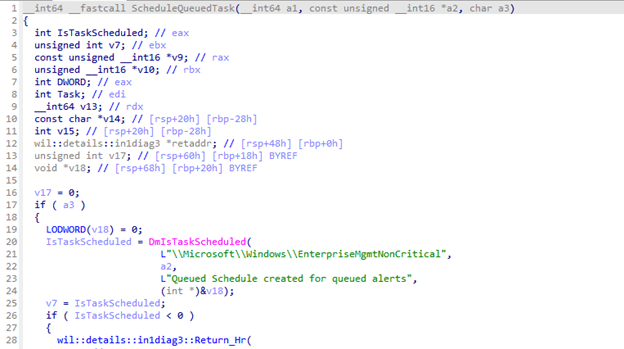
This queued path was handled through ScheduleQueuedTask, which created the infamous scheduled task under the EnterpriseMgmtNonCritical task folder.
That queued scheduled task was tied to several triggers, including WNF network-state events. It operated within a fixed execution window of five minutes. Any sync session that entered this path no longer ran instantly; instead, it waited inside that time window and was retried when conditions allowed.
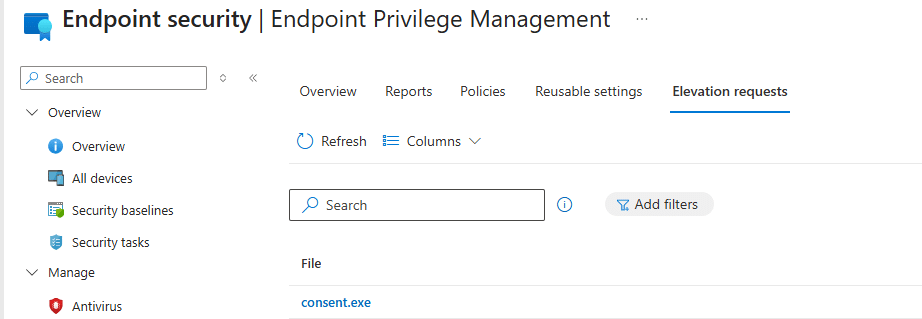
The key change was not the introduction of the queue itself, it was the shift in classification logic inside IsCriticalMsg. Push-initiated OMADM sessions were no longer automatically treated as critical. Once the push notification was stopped from qualifying as critical, it no longer bypassed the queue. Instead, it followed the same deferred execution path as other non-critical workloads. From that moment onward, the five-minute delay effectively became part of the Remote Device Action, such as a remote Wipe, Sync, or approval of an EPM elevation request.
Slower After 8 Hours
This was also when the behaviour identified in our earlier research began to manifest in real-world environments. In that previous analysis, remote actions felt fast shortly after enrollment but noticeably slower the next day. What appeared to be timing drift turned out to be the moment the client stopped treating push notifications as critical and began routing those same sessions into the queued execution pipeline.
From a reliability perspective, the change made sense for background workloads. Queuing reduced retry storms, prevented sessions from running on unstable networks, and allowed work to be batched more safely. But the same push notification is reused for almost everything Intune triggers: policy refresh, EPM Approval Requests, and even urgent device actions such as a Device wipe. That meant the change had a much broader impact than intended. The OMADM client still had no idea what the push actually represented. It only knew that a push had arrived. Instead of running immediately, it is now assumed that waiting is acceptable, even when administrators expect the device to respond straight away.
Phase Three: Defining the Push As Critical
Over time, it became clear that NOT every push initiated an OMA-DM session should be delayed.
Some scenarios required immediate execution (EPM) instead of moving through the deferred pipeline.
Microsoft introduced a selective bypass in the updated IsCriticalMsg logic.
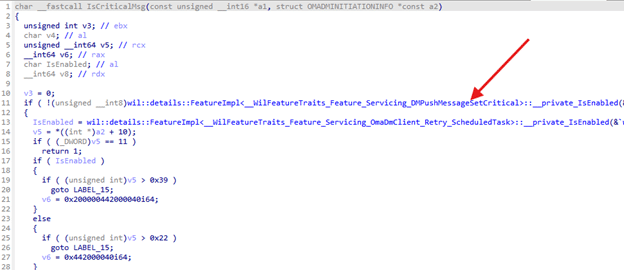
This change allowed some push messages to be marked as critical again.
That restored the immediate execution path in cases where the delay caused problems.
When a push is marked critical, the OMA-DM session skips ShouldMsgBeQueued.
It does not enter the scheduled task and is launched directly, like in the original behavior.
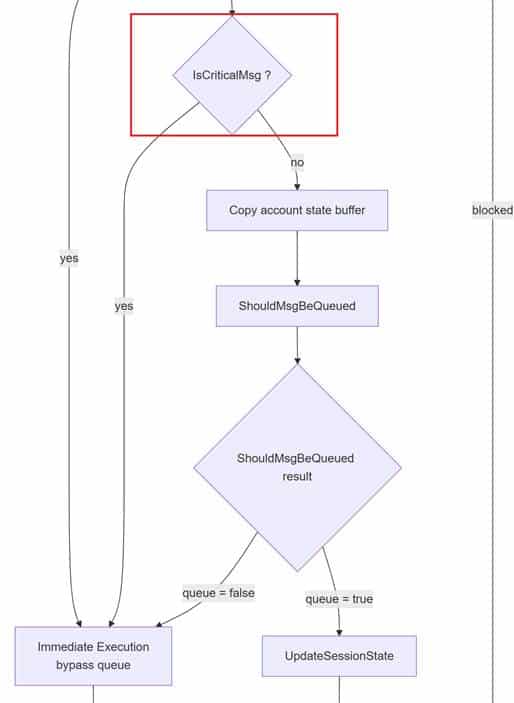
To control how and when this bypass is applied, the mechanism was placed behind a servicing feature flag: Feature_Servicing_DMPushMessageSetCritical

This indicates that Microsoft did not want to flip the behaviour globally in a single step, but instead intended to roll it out gradually (Controlled Feature Rollout). From there on, they could observe the impact and selectively enable the critical lane where appropriate. Conceptually, the model shifts to a more balanced state: the queue becomes the safe default for most scenarios, while the critical path is reintroduced only when delay is known to be harmful or disruptive.
So that leaves us with 1 big question: When will this gradual Rollout Happen? Well… that’s something I will keep a secret until I will notice the Control Feature Rollout kicking in.
Summary
Remote Device Actions, such as wipe, sync, or EPM elevation requests, originally ran instantly because push messages were treated as critical. The OMA-DM client launched sessions immediately instead of queueing them. After the IsCriticalMsg change (a couple of years ago), push sessions were deferred to a queued path with a 5-minute delay. This also affected policy refresh and urgent actions such as wipe and EPM. In February 2026, Microsoft added a bypass(DmPushMessageSetCritical) that restores instant execution for all remote Intune Device Actions on Windows 24h2/25h2 (Not 23h2 🙂 ).