

If you manage Microsoft Intune day-to-day, you will know the feeling. You open the web browser, head to the devices report, see a reassuring amount of green, and still cannot answer the one question that matters:
Are we actually covered?
Because “compliant” is a useful signal, but it is not the same thing as defensible endpoint visibility.
Most Microsoft environments don’t have endpoint visibility. They have fragmented Intune reporting, partial data, and just enough signal to feel confident without being able to prove anything.
That gap is the real problem. We’ll break down where Intune reporting falls short, why that creates risk across IT and security, and what decision-grade visibility looks like when you need answers you can trust and act on.
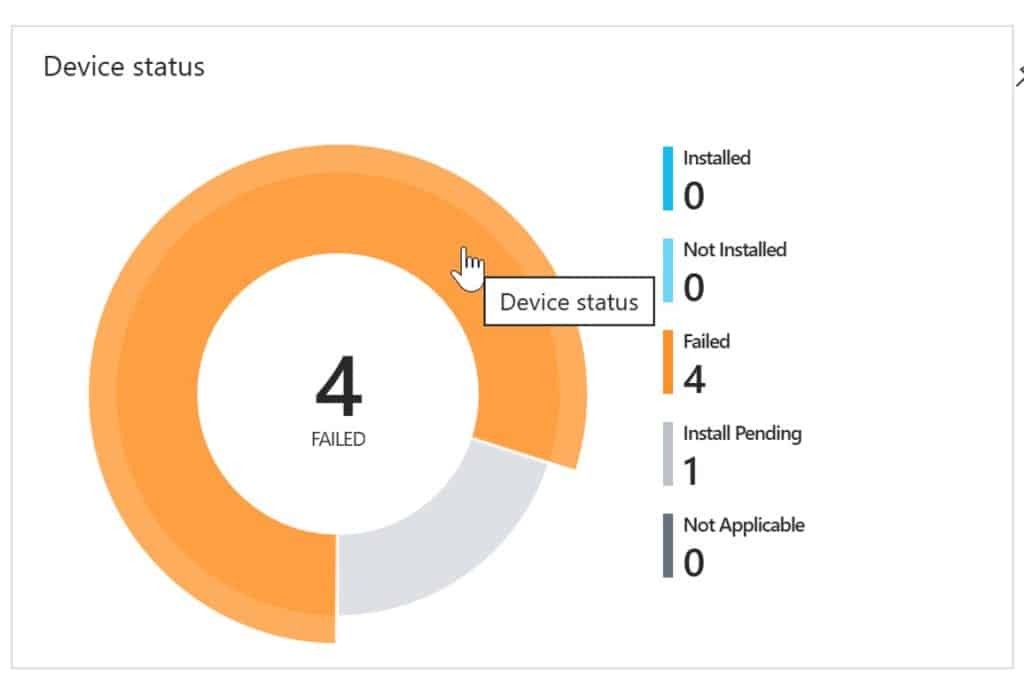
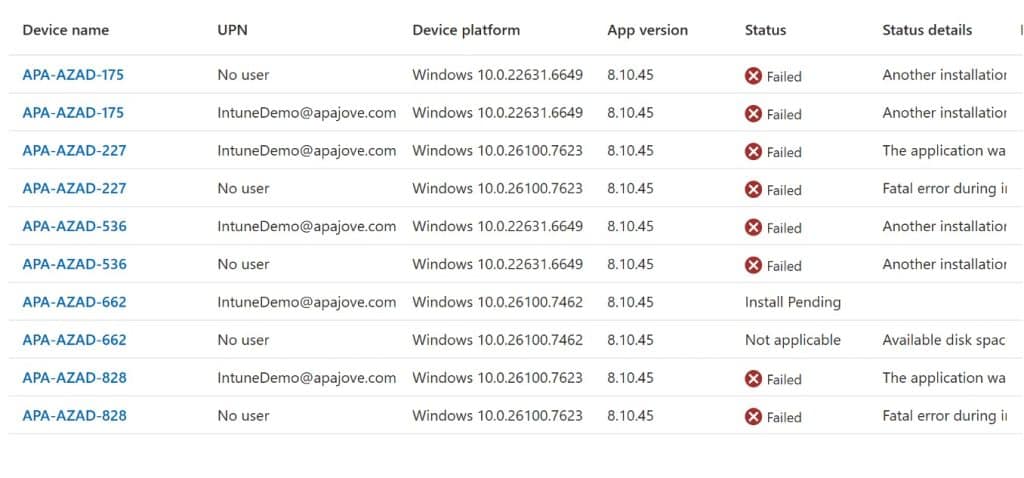
Caption: “When the top-level donut chart says 4, but the drill-through says 10.”
1. Most organisations think they have endpoint visibility. They don’t.
What we hear when talking to customers is that the patching experience in Intune is a bit “trust us, it’s fine”, there’s no data to back this up. Intune collects a large amount of endpoint data, but turning that data collection into reliable device compliance reports is where things start to break down.
As with Configuration Manager, Microsoft just has not done a good job of providing reporting on the data they gather from your devices. Worse than with ConfigMgr, we’re often not gathering this kind of data anyway.
But endpoint compliance visibility essentially does not exist in the Intune world
Endpoint visibility is being able to prove, close to real time, that every managed device and application is secure and accounted for. It is continuous, unified, and actionable. You can scale it out to the teams who need it, including IT admins, IT directors, service desk, and security.
That is the difference between having endpoint data and having visibility you can defend.
2. Endpoint visibility vs. endpoint detection
A lot of articles online drift into EDR and threat detection. That is important, but it is a different job from the day to day endpoint management role in a lot of organisations.
Endpoint detection is what happens after something goes wrong.
Endpoint visibility is knowing your compliance status and patch posture before its a problem.
If your visibility story stops at “we have an agent that will alert us when things are bad”, you are basically saying “we will find out the hard way”.
Good endpoint visibility reduces the odds of bad days in the first place.
3. Why “compliant” doesn’t mean “covered”
This is the trap: a device can show compliant in Microsoft Intune and still be running outdated third-party applications. Natively Intune provides very little in this space, but even with an integrated 3rd Party app catalog, Intune’s compliance reporting is non-existent.
Compliance Status Is Not the Same as Coverage
Operating systems compliance is not the same as application compliance, and even if it were, Intune still lacks any decent OS patch reporting. That gap matters.
A lot of organisations can tell you whether Windows is update compliant, far fewer can tell you, quickly and confidently, whether the applications actually used by the business are patched, up to date, and not quietly accumulating risk.
If you have ever had to explain this to a security team or leadership, you know the next part of the conversation:
- “So are we patched?”
- “Well, Windows is compliant…”
- “No, are we patched?”
That is why this topic keeps coming up.
4. Intune Reporting: Where Visibility Starts and Breaks
Intune reporting is the primary way most teams understand device compliance, configuration, and patch status, but it was not designed to provide a complete or operational view of endpoint health.
The complaint we hear about Configuration Manager is that it builds a good data set but it does not present it well.
The complaint we hear about Intune is that it sometimes does not even do that.
Some of the Intune dataset is super useful. The problem is how it is surfaced and how easy it is to operate from daily.
The “donut chart problem”
It is not uncommon to see a top-level donut chart telling you 50 machines are in a particular state, and then when you click through you see 76 machines. Or 10. Or both.
This happens because of the way Intune data summarisation works in the backend. The data at the top level might be one hour old, while the drill-through data might be 24 hours old.
So you are left tearing your hair out, trying to work out whether you have a compliance problem or a timing problem.
“Deeper insights” often becomes “build your own reporting stack”
When teams need more operational reporting, especially to support endpoint security decisions, they often end up creating custom reports, wiring up Azure Monitor, using Log Analytics, or building Power BI dashboards.
That can work, but it is not free. It takes time, skills, ongoing maintenance, and usually one poor soul who becomes the owner of the reporting pipeline, bending technologies not designed for this to squeeze some useful data our of remediation scripts.
And when people say “we want better reporting”, what they often mean is “we want something we can use without becoming a part-time data engineer”.
5. Visibility Breaks Fastest Between ConfigMgr and Intune
Even if your strategy is “cloud only”, your present might be co-management, migration, or a split workload across Microsoft Intune and Configuration Manager.
When reporting lives across Intune and Configuration Manager, visibility fragments quickly. If you cannot see Patch Compliance as you move from the Configuration Manager world to cloud native, you do not have complete endpoint visibility.
6. The blind spot: third-party patch management
If you stop at Windows Update, your endpoint visibility is incomplete.
This is where real-world risk lives. Third-party apps are everywhere, they change constantly, and they are a favourite place for vulnerabilities to hide.
The reality in many Intune environments today is that we can deploy apps and updates, enable autopatch, do all the right things, and still broadly have to trust to the Intune gods that it will do the thing you wanted it to do.
That is not a great place to be when security asks for evidence.
7. From reporting data to decision-grade visibility
Application deployment reports are not update compliance reports.
Decision-grade visibility is continuous, unified, and actionable.
A quick test:
If your security team asked you, right now:
- Which devices are actually compliant, and why are the non-compliant ones non-compliant?
- What is our patch posture across third-party applications?
- Is our compliance rate improving?
- Are you relying on the strings recorded in Add/Remove Programs to track software versions?
Could you answer confidently, in minutes, using Intune?
8. If You Can’t Answer These Questions, You Don’t Have Endpoint Visibility
This is where traditional Intune reporting stops being useful for day-to-day decisions.
Complete endpoint visibility should let you do all of this, quickly:
- Identify managed devices instantly, including gaps and unknowns.
- Understand compliance status and drill into the why, with data you can trust.
- Track software updates and application patch compliance, including third-party patching.
- View historical data so you can defend improvement over time.
- Avoid living in Power BI for basics, unless you want to.
- Scale access beyond a small admin group, with roles and usability that work for service desk and leadership too.
In other words, it should not just show you data. It should help you manage risk.
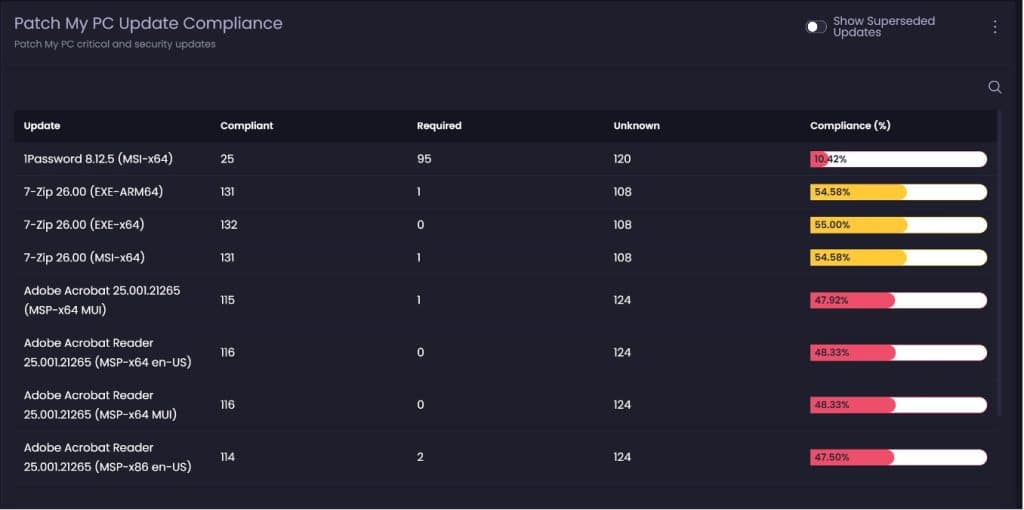
Caption: “Compliance that is based on detection logic, not lagging deployment stats.”
9. Introducing complete endpoint visibility for Microsoft environments
This is where Advanced Insights for Intune comes in.
The goal is not “more dashboards”. The goal is clarity. To close the gap between reporting and reality by unifying endpoint management reporting, compliance visibility, and third-party patch insights into a single view.
Two data sources, used where they make sense
First, use Microsoft Graph where it is appropriate. Present the data available in Graph in an interface that is more intuitive, more attractive, and more workable. That includes things like managed devices, non-compliant devices, managed apps, discovered apps, Windows build breakdowns, and a growing set of other Intune datasets.
The Graph provides good, but limited, data, we want to do a good job of presenting this data in a more attractive and intuitive style, to make the data you have from Intune more useable and relevant. More endpoints and reporting views get added over time.
Second, use a lightweight reporting agent where Intune does not provide enough depth.
The Patch My PC Client is a lightweight reporting agent, deployed via Intune like as application, and it is used to build richer reporting experiences that are not Graph-based.
That is what unlocks fast, data-dense experiences including true application and OS update compliance inventory, and it is also what enables broader visibility into hardware and software state.
Compliance that is about reality, not lag
Deployment statistics from Intune can lag, and they often reflect installation success, not actual detected state.
The approach we take with Advanced Insights is much more robust. We run detection logic from the catalog against each client, bring the compliance scan results back, and report on what is installed, what is required, and what is missing.
That is the difference between “we deployed it” and “we are compliant”.
Filling the hardware inventory gap
There is very little in terms of hardware inventory from Intune clients compared to what people were used to in ConfigMgr, and even ConfigMgr lacked info on some important inventory classes.
The intent is to bring in the properties people actually care about, based on what we have learned from our work developing Advanced Insights for Configuration Manager. This includes hardware inventory insights that are meaningful in day-to-day device management around battery and disk health, browser extensions, user-based app installs and loads more.
The Reality: You Either Have Visibility or You Don’t
If your Intune reporting relies on exports, spreadsheets, and detective work, you are working around a visibility gap.
Endpoint visibility is not a chart. It is confidence.
If you can’t answer what is installed, what is missing, and why, that is the gap. And it is the gap between thinking you are covered and being able to prove it.
It is also the gap between security identifying risk and IT knowing how to fix it. When both teams work from the same view, “secure” finally means the same thing.
See how this works in your environment with a demo led by our engineers so you can prove your company is compliant, secure, and easily show the why with Advanced Insights.