
Win32 app installs stopped without any visible change in Intune. The portal still looked healthy, but on the device, the Intune Management Extension had already failed to get an AAD token. When authentication breaks at that level, nothing else in the flow ever starts.
Introduction
Some Intune issues are difficult not because they are complex, but because nothing appears to have changed. Let me explain! There were no recent policy adjustments, nothing that could explain what was happening. From the outside, the tenant looked exactly the same as it had the day before. And yet, something fundamental stopped working.
This investigation began when Win32 apps suddenly stopped installing on devices that had been managed for an extended period. And yet again, the company portal was stuck on downloading:
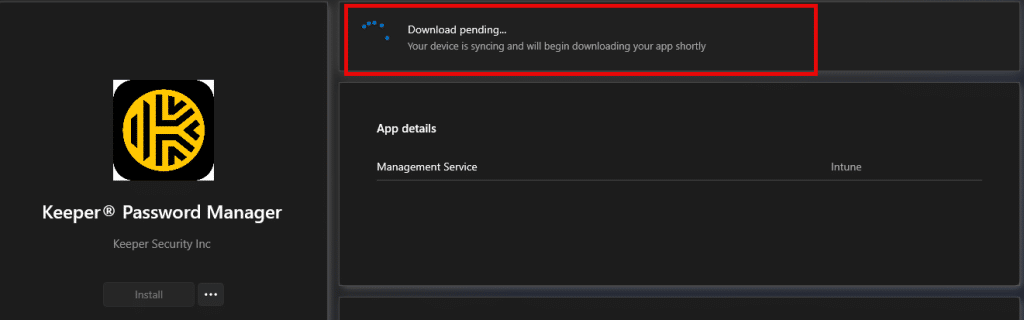
These were not only freshly enrolled machines. These devices had been stable for months, sometimes years, and had installed many apps without issues in the past.
At first glance, it felt like one of those situations where Intune simply needs time to catch up. But waiting did not help. Reassigning apps did not help either. And the longer we looked at the Intune portal, the clearer it became that the portal was not going to provide the answer. That is usually the point at which troubleshooting must shift from what Intune reports to what the device itself is actually doing. And that is where this story really begins.
What the Intune portal does not tell you
From the Intune portal’s perspective, everything still appeared healthy. Assignments were intact, devices were reported as compliant, and there were no failed deployments, indicating a clear root cause. Nothing in the UI suggested that Win32 app processing had stopped.
That lack of signal is important because it tells you something early on. When the portal shows no failures but apps still don’t install, the issue is rarely about the app assignments themselves. It is usually about something more fundamental that prevents the device from even reaching the stage where assignments matter. In Intune, that almost always indicates token authentication issues.
Why the Intune Management Extension is the real starting point
Win32 apps do not install because the portal says they should. They install because the Intune Management Extension starts a session, authenticates successfully, and receives instructions from the service. If you want to read the details, please read this blog:
Company Portal Stuck on Downloading: Token Error IDX12729

As that blog shows, the bearer Authentication token is critical; if the IME failed to get AAD Token (Authenticate), no applications will be downloaded. No amount of waiting, syncing, or reassigning apps will change that. The focus then shifted to the Intune Management Extension log.
Failed to get AAD token, causing the IME to stop
Reading through the IME log, one thing became clear very quickly. The intune management extension never reached a point where app content was evaluated. It never progressed far enough to look at detection rules or download installers. Instead, it failed at the very beginning of the required app check-in process.

The IME was unable to acquire an access token.(Failed to get AAD token)

When zooming in on the error code Failed to get AAD token: 3399614476, things started to make a bit more sense.

The error code 3399614476 translates to “sign-in blocked/failed to authenticate”. That result immediately created tension. Users were not blocked. They could sign in to Windows without any issues, access Microsoft 365, and open Company Portal normally. Nothing about the user accounts indicated a sign-in problem. So the sign-in block was real, but it was not affecting the user.
Realising IME signs in as an application
This is the point where the investigation changes direction. The Intune Management Extension does not only authenticate on behalf of the signed-in user. It also requires a token to talk with an enterprise application. That application identity is required for IME to communicate with Intune services and request processing instructions. The IME log makes this explicit by showing the client ID used during token acquisition: fc0f3af4-6835-4174-b806-f7db311fd2f3

That client ID belongs to the Microsoft Intune Windows Agent Enterprise Application.
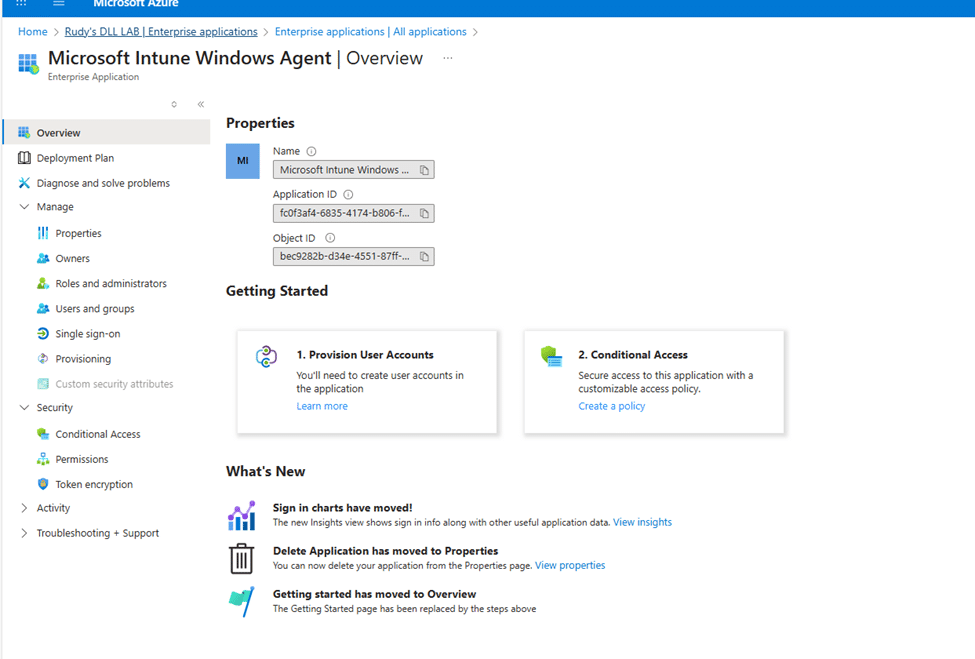
At that moment, the meaning of the error became clear. The sign-in block was not about the user. It was about the application identity IME depends on. If that identity cannot sign in, IME cannot function, regardless of how healthy the user account looks. With it, you will find the Failed to get AAD token and errorcode 3399614476.
Searching for an Application that should exist but does not
Once the application identity was known, the next step seemed obvious. The application needed to be inspected in Entra ID. But that is where things stopped making sense.
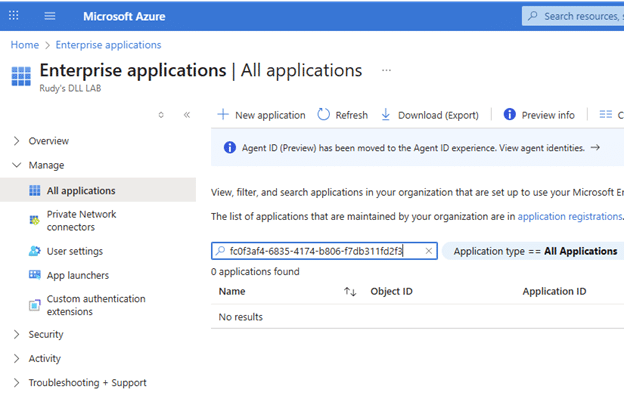
Searching for Enterprise Applications by name returned no results. Searching by application ID returned nothing. Filtering for Microsoft applications did not help. Graph queries returned empty results. PowerShell could not find anything either. The application simply did not exist in the tenant.
That should not have been possible. This tenant had been using Intune for years. These same devices had installed Win32 apps countless times before. Tokens were successfully issued in the past. And yet, there was no enterprise application to inspect.
Microsoft Intune Windows Agent is Principal-less by default
The explanation lies in how IME has been authenticating to date. The Microsoft Intune Windows Agent client ID was using service principal-less authentication. The application exists globally in Microsoft’s tenant, but no tenant-local service principal object has ever been created in this tenant.
Without that object, there is nothing for Entra to show. Nothing for Graph to return. Nothing for PowerShell to query. Despite that, authentication can still succeed. This is not an assumption. The sign-in logs confirm it.
The sign-in detail that explains years of normal behaviour
Reviewing older successful sign-in events for the IME client ID revealed the key detail. The Service principal ID field did not contain a real object ID. Instead, it contained all zeros.
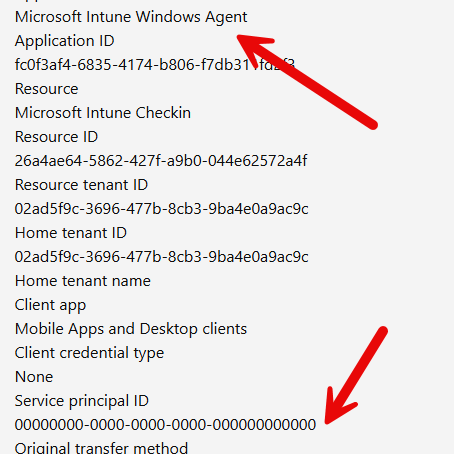
That value explicitly indicates that the sign-in occurred without a client service principal in the tenant. The IME had been authenticating successfully for years without a tenant-local service principal. That explains why apps are installed normally, why the application was invisible, and why there was no tenant-side switch that could accidentally break it. As long as the application remained service principal-less, there was nothing to enable.
When the Microsoft Intune Windows Agent show up
Things changed the moment the service principal was created manually using Graph.
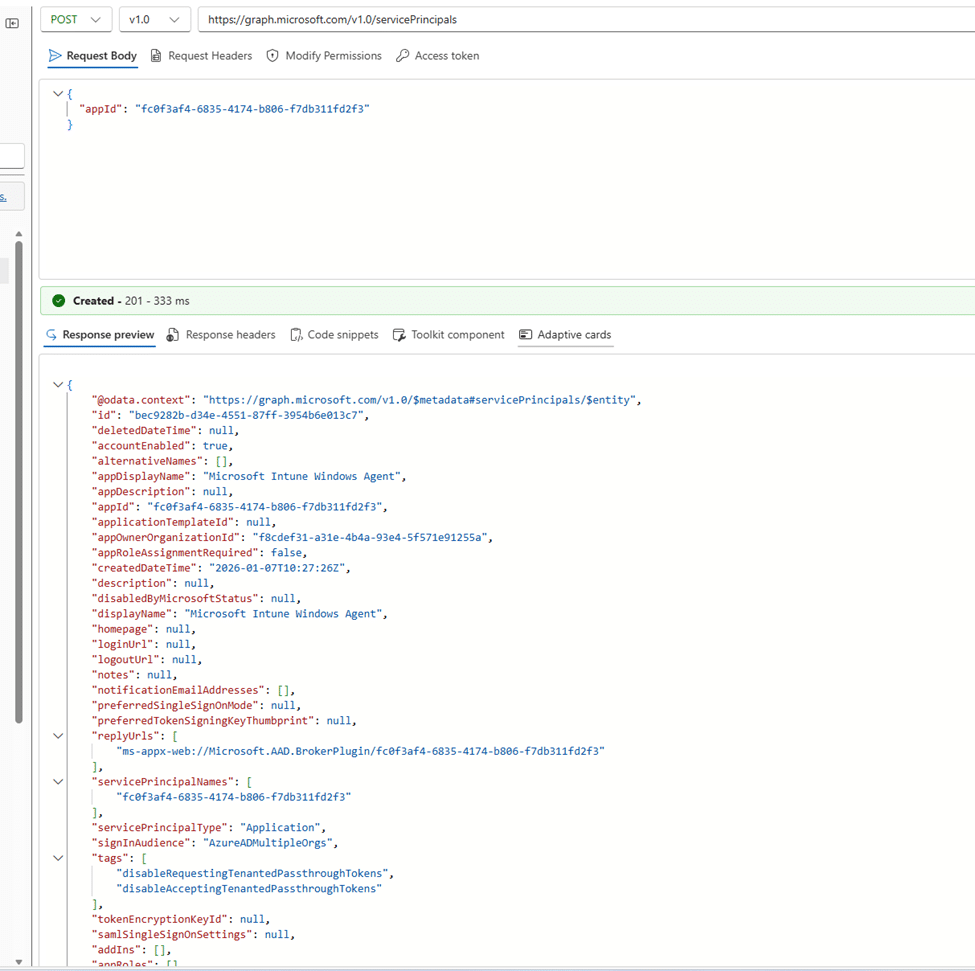
The effect was immediate. The application appeared in Enterprise Applications. Graph queries started returning results. The display name and reply URLs were automatically populated from the global Microsoft app definition. From that moment on, the application was no longer invisible. It became a standard tenant-backed enterprise application with its own service principal ID.
Microsoft Intune Windows Agent no longer principal-less
After the service principal existed, new sign-in events looked different. The Service principal ID field now contains a real object ID instead of all zeros.
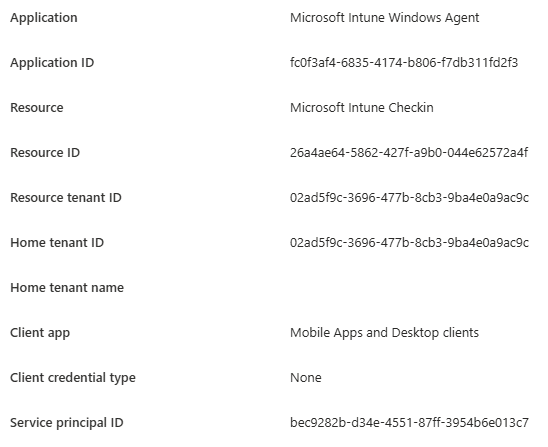
That single change meant the IME was no longer authenticating service principal-less. It was now authenticating as a tenant-managed application. Nothing changed on those devices themselves. The creation of the tenant-managed application now gives us additional tenant-level control over the application.
Why have apps stopped installing on existing devices
With the service principal in place, one property suddenly mattered: accountEnabled.
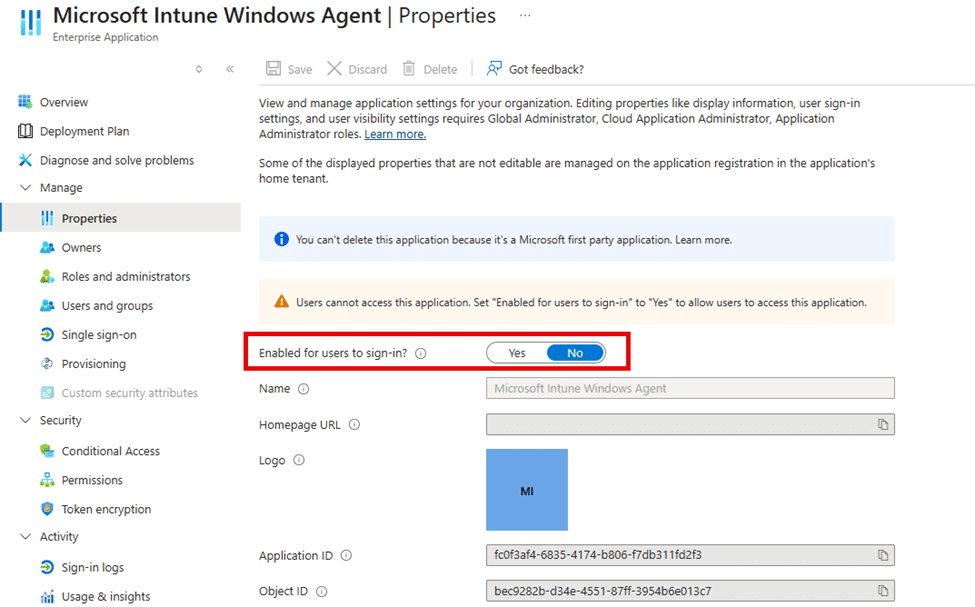
If that value is set to false, Entra blocks application sign-in. When application sign-in is blocked, IME cannot acquire a token (Failed to get AAD token 3399614476). Without a token, it cannot communicate with Intune services. Without that communication, Win32 apps never start processing. That is exactly what the IME log had been telling us from the beginning.
The error message was correct all along. It just did not make sense until the application identity behind it was fully understood.
Why Microsoft Online Services appears in the audit logs
In another tenant with the same issue, the audit logs showed that the service principal was disabled by Microsoft Online Services rather than by a user.
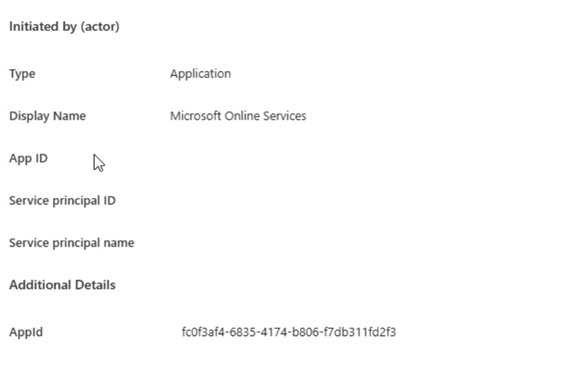
That detail matters, but it does not change the underlying explanation. You cannot disable a service principal that does not exist. At the moment that action was recorded, the service principal must have existed, even if it was not visible or manageable afterwards.
The most plausible explanation is that the tenant transitioned away from service principal-less authentication, Entra materialised the service principal as part of that transition, and a Microsoft backend process disabled it. The tenant was left in a broken state until the service principal was manually created and re-enabled.
Is this related to Microsoft blocking service principal-less authentication
Microsoft is retiring service principal-less authentication, but they are mentioning that enforcement is targeted at third-party applications.

They also mention that Microsoft-owned applications are explicitly excluded and handled by Microsoft themselves…. Handled by Microsoft…?
Why does enabling it fix everything immediately
Once the service principal is enabled again, the entire chain recovers instantly.
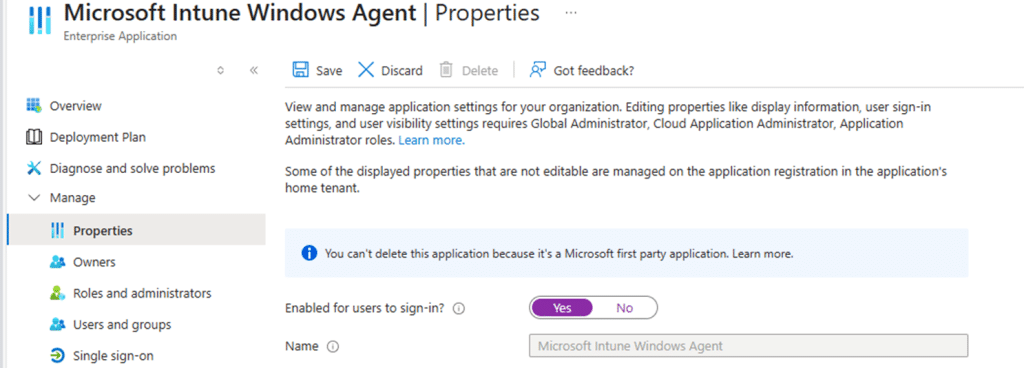
IME can acquire its token, communication with Intune resumes, and Win32 apps start installing again without any changes to assignments, devices, or enrollment. Nothing on the device itself was ever broken.
The real takeaway
If you run into issues where the Win32 apps aren’t deploying and you see Failed to get AAD token and the 3399614476 error in the IME log, you know what to do… Check out if the Microsoft Intune Windows Agent sign-in is disabled.