

A Brief History of Adobe
Adobe was founded in 1982 with PostScript, laying the foundation for digital document rendering and enterprise printing. Early adoption through the Apple LaserWriter brought Adobe technology into business environments.
With the introduction of PDF Reader in 1993, Adobe standardized digital document exchange across organizations. In the 2000s, Adobe expanded its portfolio with Creative Suite, and in 2013 shifted to a subscription‑based model with Creative Cloud. In the 2020s, Adobe further expanded its cloud‑based offerings, introducing more frequent releases across Creative Cloud and Document Cloud applications.
If you want to jump straight to the conclusion, please click on this link.
Adobe Product Overview
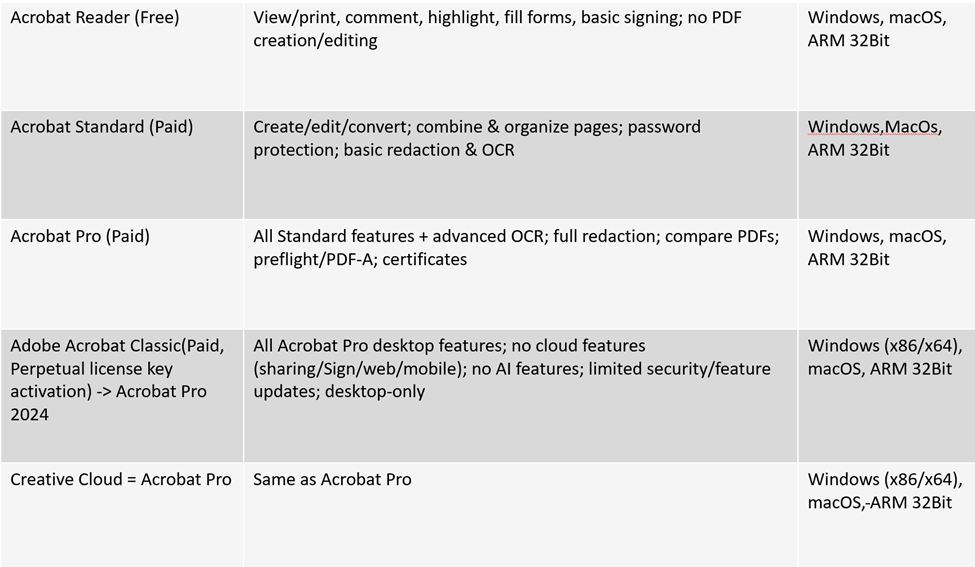
Adobe has different products and services
- Acrobat Reader
Free PDF viewing, printing, commenting, form fill, and basic signing. - Acrobat Standard
Paid version with PDF creation, editing, conversion, basic redaction, and OCR. - Acrobat Pro
Full feature set including advanced OCR, full redaction, PDF comparison, preflight, and certificates. - Adobe Acrobat Classic
Paid perpetual license for Acrobat Pro 2024. Desktop only. No cloud or AI features. Limited updates. - Creative Cloud Acrobat Pro
Same functionality as Acrobat Pro, delivered via Creative Cloud subscription.
Adobe classic
Adobe’s Classic track refers to the perpetual (non‑subscription) releases of Acrobat, distributed via MSI base installs and MSP updates. Over time, Adobe retired the “Classic” name, but not the concept.
- Acrobat Classic 2015 – End of life
- Acrobat Classic 2017 – End of life
- Acrobat Classic 2020 – End of life on November 30, 2025 (still supported until then). But Adobe is still updating it in 2026, so we will not remove it for now in our app catalog.
- Acrobat Pro 2024 – Current Classic‑track release, now without the “Classic” label
Despite the rebranding, Acrobat Pro 2024 continues the same model: a perpetual license with controlled updates, familiar to IT teams managing MSI deployments and MSP patching.
Only the name changed. The lifecycle behavior did not.
You can find this version in PMPC Cloud, although it is incorrectly named. It should be listed as Acrobat Pro 2024.
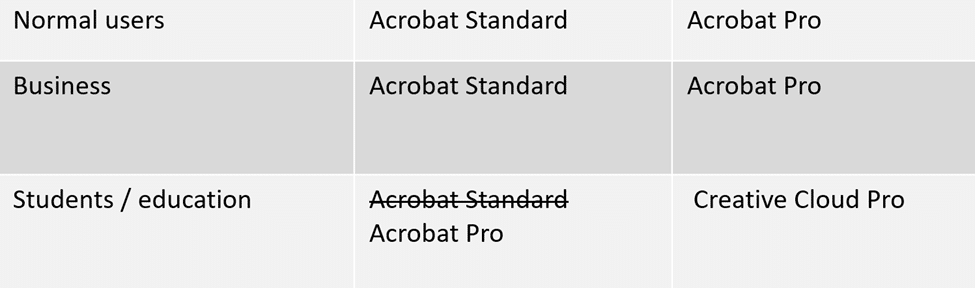
Acrobat products by Audience
Individuals
Adobe offers both Acrobat Standard and Acrobat Pro for individual users, depending on feature requirements.
Business
Organizations can choose between Acrobat Standard and Acrobat Pro for commercial use, available through individual or team licensing.
Students and Education
Education licensing is centered on Acrobat Pro, either as a standalone education plan or included with Creative Cloud for Students and Teachers, which bundles Acrobat Pro with additional Adobe applications.
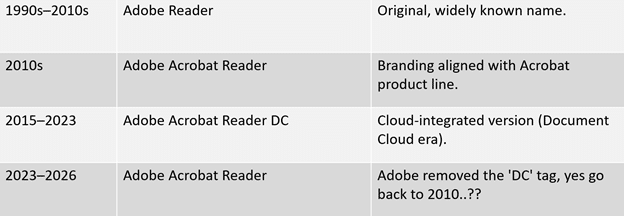
Adobe Reader Naming History
Adobe’s free PDF viewer has existed for decades, but its name has changed several times as Adobe adjusted its product and branding strategy.
In the 1990s and 2000s, the application was simply known as Adobe Reader. This name became widely recognized and synonymous with viewing PDF files.
During the 2010s, Adobe renamed the product to Adobe Acrobat Reader, aligning it more closely with the Acrobat product family.
From 2015 through 2023, the application was branded as Adobe Acrobat Reader DC. The “DC” designation reflected Adobe’s broader Document Cloud branding during this period.
Starting in 2023, Adobe removed the “DC” label and reverted to the name Adobe Acrobat Reader. Functionally, the product remained the same free PDF reader, but the branding was simplified.
Adobe Reader Installation Options
Adobe Reader is available through multiple installer types including Patch My PC Cloud.
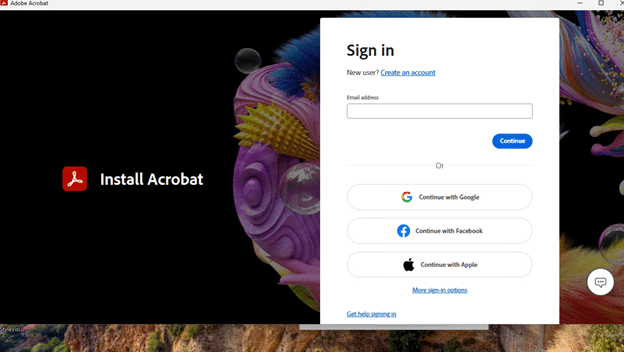
- Creative Cloud Desktop Application
Reader can be installed via the Adobe Creative Cloud Desktop Application. This method requires an Adobe account sign‑in.
- Standalone EXE Installer
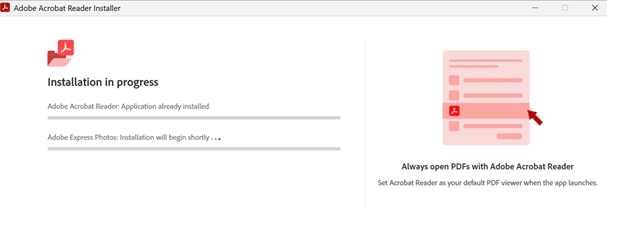
Adobe provides a standalone executable installer, commonly distributed as Reader_en_install.exe. This allows installation without Creative Cloud and is a webinstaller.
- Exe (offline) and MSP Installers
EXE and MSP packages are available for managed deployments. These formats are used for enterprise installation and updates and are available through Patch My PC Cloud.
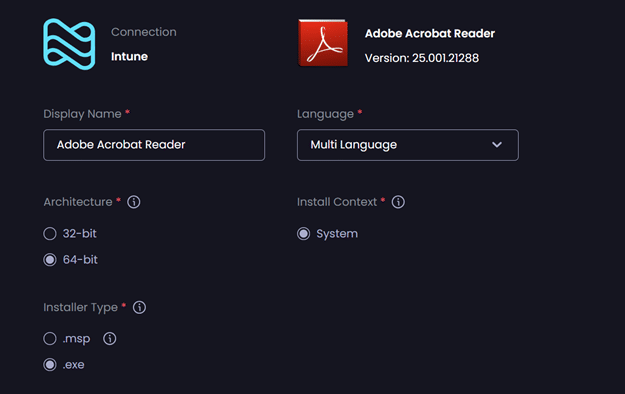
The .exe installer type can do a clean installation and update Adobe Acrobat Reader.
The .msp installer type can deploy an update only package.
Note: You don’t need to deploy the .msp installer type if you deploy the .exe with a required assignment.
Updating Adobe Reader: Product Class vs Unified Installer
Per Product Class Updates (Not Recommended)
Updating Reader per product class means treating each installer, version, or track as its own lifecycle. In theory, this gives control. In practice, it creates fragmentation.
- Multiple installers to manage
- Separate detection and update logic per version
- Higher risk of missed patches
- Inconsistent versions across the estate
This approach does not age well. Every new release adds complexity, and over time the environment drifts. Security posture depends on perfect execution, which rarely happens at scale.
Result: more effort, more exceptions, less certainty.
A quick guide how to update per product class with Patch My PC cloud
Update Adobe Acrobat Reader.
Recommended if you just deploy this as a Required assignment.
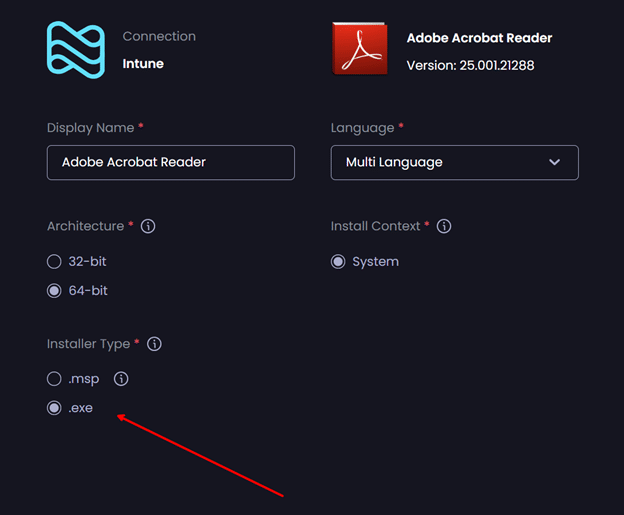
If you want to deploy an available and update only. You will need to work with a combination of the .exe and the .msp (update).
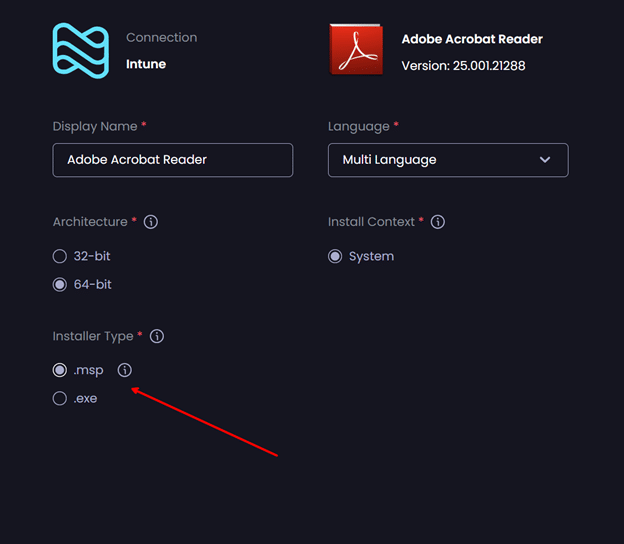
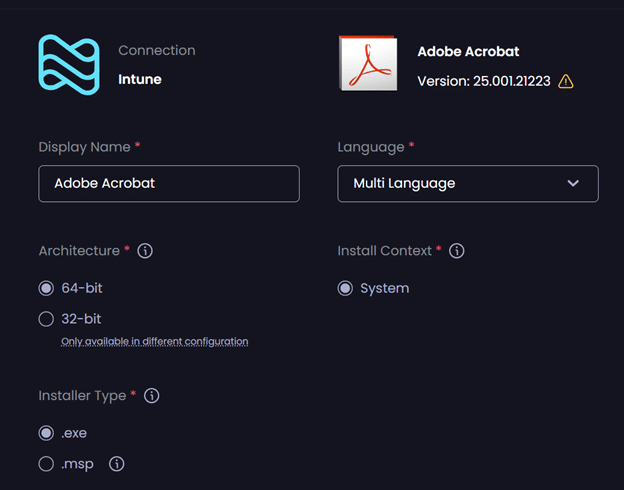
Same concept for Adobe Pro (Adobe Acrobat).
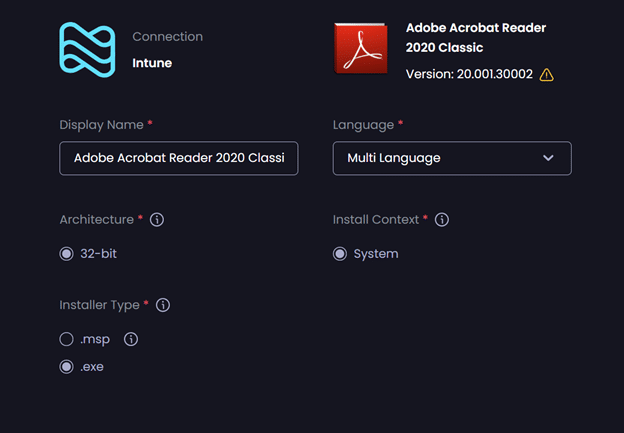
Or Adobe Reader Classic
Unified Installer (Recommended)
The unified installer flips the model. Instead of managing versions, you manage the whole product.
- One install source
- One update path
- Predictable patching behavior
- Consistent versioning across devices
Updates become incremental and continuous rather than event‑driven. From an operational and security perspective, this is the only model that reliably holds up over time.
Result: fewer moving parts, fewer mistakes, improved compliance, and reduced operational overhead from managing fewer applications.
On the Adobe webpage, we can see this table that shows how flexible this Unified installer is.
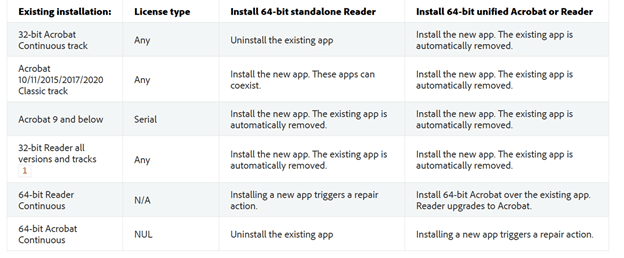
Source: Unified installer for Windows 64-bit — Deployment Planning and Configuration
Deploying Unified Adobe Acrobat
Before we begin, it’s important to clarify a key point that is often misunderstood:
The Adobe Acrobat installer is the same for all editions.
There is no separate installer for:
- Adobe Acrobat Reader
- Adobe Acrobat Standard
- Adobe Acrobat Pro
In other words:
Adobe Acrobat (Unified) = Acrobat Pro = Acrobat Standard
The installer is identical.
What changes is how the application behaves at runtime, based on licensing and policy configuration.
We can make the Adobe Acrobat run in a Unified state if we add the following regkeys (Official Adobe documentation)
A post‑install script must be added here using PMPC Cloud.
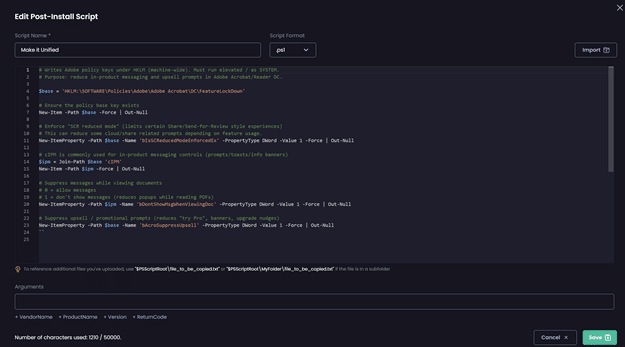
Example code
# Writes Adobe policy keys under HKLM (machine-wide). Must run elevated / as SYSTEM.
# Purpose: reduce in-product messaging and upsell prompts in Adobe Acrobat/Reader DC.
$base = 'HKLM:\SOFTWARE\Policies\Adobe\Adobe Acrobat\DC\FeatureLockDown'

# Ensure the policy base key exists
New-Item -Path $base -Force | Out-Null

# Enforce "SCR reduced mode" (limits certain Share/Send-for-Review style experiences)

# This can reduce some cloud/share related prompts depending on feature usage.
New-ItemProperty -Path $base -Name 'bIsSCReducedModeEnforcedEx' -PropertyType DWord -Value 1 -Force | Out-Null

# cIPM is commonly used for in-product messaging controls (prompts/toasts/info banners)

$ipm = Join-Path $base 'cIPM'
New-Item -Path $ipm -Force | Out-Null

# Suppress messages while viewing documents
# 0 = allow messages
# 1 = don't show messages (reduces popups while reading PDFs)

New-ItemProperty -Path $ipm -Name 'bDontShowMsgWhenViewingDoc' -PropertyType DWord -Value 1 -Force | Out-Null

# Suppress upsell / promotional prompts (reduces "try Pro", banners, upgrade nudges)
New-ItemProperty -Path $base -Name 'bAcroSuppressUpsell' -PropertyType DWord -Value 1 -Force | Out-Null
Expected behavior
- Adobe Acrobat installs once and runs for Reader, Standard, and Pro users
- Users without a Pro license can still open and use PDFs without the application closing
- Pro features remain license‑controlled and unlock automatically for licensed users
- Reduced in‑product messaging and fewer upsell prompts (depending on policy settings)
- A single install base can be patched and updated consistently
Note: You still need to deploy the .msp if you want to utilize the update only option
Please vote on this Idea to support a single Adobe Acrobat (Unified) application that can perform both a full install and update‑only actions. The .exe installer should also be supported as an update mechanism, not limited to the .msp installer.
Summary:
This blog explains how Adobe’s Acrobat products, naming, and licensing evolved, and why patching has become unnecessarily complex for IT. It shows that Reader, Standard, and Pro all use the same unified installer, with behavior controlled by licensing and policy, not separate packages. Managing updates per product class increases fragmentation and risk, while the unified installer model provides consistent patching and simpler operations. With the correct registry configuration, a single Acrobat deployment can safely cover all scenarios with fewer apps, fewer errors, and better compliance.