
This article walks through the ConfigMgr Application Model, focusing on how it differs from legacy Packages, how to build and deploy applications, and how to troubleshoot using policy evaluation and logs. Let’s start with the high-level differences and move into hands-on functionality and flow.
Key Differences Between Applications and Packages
Applications, introduced in ConfigMgr 2012, offer a smarter and more flexible way to deploy software compared to traditional Packages. Some of the key differences:
- Packages can run content directly from a DP share, with optional programs defined for execution.
- Applications always download content from the DP before execution and include:
- Detection rules to determine install state
- Custom requirements via Global Conditions
- Dependencies and Supersedence logic
- Revisions for version control
Better Software Center experience with icons, names, and dedicated install/uninstall/repair options
Converting Packages to Applications
Common candidates like 7-Zip or C++ redistributables are easy to convert and benefit from detection and self-heal
When building Applications, key features include:
- Software Center customization: Branding, categories, and icons
- Dedicated install/uninstall/repair deployment types
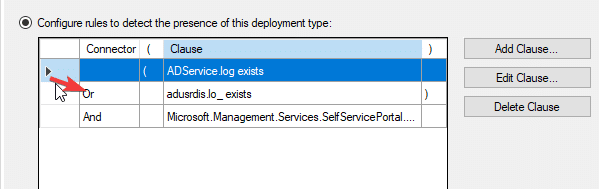
- Detection methods: Including scripts with defined return values (e.g., 0 = installed, 1 = not installed, 2 = retry)
- Requirements and global conditions to define install eligibility
- Dependencies and Supersedence for upgrade paths and runtime prerequisites
- Application Groups (preview feature)
Policy
Once you’ve deployed an application, the next step is understanding how it’s processed on the client—and how to troubleshoot when something doesn’t go as expected.
Policy Retrieval
ConfigMgr clients regularly poll the management point for policy updates. When an application is deployed, the client downloads the policy that includes information such as detection rules, content location, requirements, and install behavior.
Use Support Center
- View active and historical policy
- Watch evaluation as it happens
- Inspect app and deployment state in WMI
- Review client health status
WMI
WMI is where much of the client-side application metadata is stored. You can use it to:
- Verify which applications are detected as installed
- View state for specific deployments
- Confirm requirement evaluations and dependency chains
Key Logs for Troubleshooting
These logs are essential for tracing the lifecycle of an app deployment on a client:
- AppIntentEval.log – Decides should this app be installed?
- AppDiscovery.log – Runs the detection method to see if it’s already installed
- AppEnforce.log – Handles the install process and logs success/failure
Flow
- Notable high-level differences for Packages versus Applications
- [Package only] Copy the content to a package share on the DP
- [Package only] Can install software with the content directly from the DP without downloading
- [Application only] Detection
- [Application only] Custom requirements (global conditions)
- [Application only] Revisions
- User experience in Software Center
- Any one else on the call think of any that are high-level worth mentioning?
- Convert Packages to Applications
- Convert 7-Zip and C++
- Walk-through key Application functionality / features:
- Software Center customisation
- Dedicated install, uninstall and repair functions
- Detection
- Scripts and parentheses of operational precedence
- Dependencies
- In Packages too
- Requirements and global conditions
- Basic requirements in Packages too
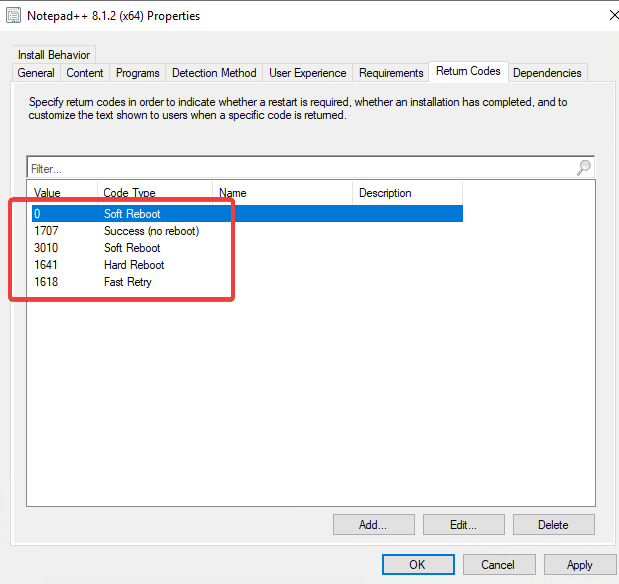
- Return codes
- Supersedence
- Revisions
- Application Groups (pre-release)
- Can’t use in a task sequence!
- Policy & Logs
- <Deploy application to collection>
- Look at a client evaluating policy life using Support Center
- Look at where the client stores applications in WMI
- Logs
- AppIntentEval, AppDiscovery and AppEnforce
- Look at where the server stores applications in WMI
- Final protips or gotcha’s
- Update Content
- Script detection interprets particular outputs as particular results:
https://docs.microsoft.com/en-us/mem/configmgr/apps/deploy-use/create-applications#about-custom-script-detection-methods