

The moment the IME version 1.101.105.0 was released, and the IME stopped responding completely, with no new logs being written, I knew where to look. Microsoft needed a way to fix the config file versioning problem from the first issue, but the change introduced in IME version 1.101.103.0 created a new one instead. After I reached out, Microsoft published incident IT1272653, which confirmed that a required configuration file had become unavailable.
This is the story of how that fix went wrong, why the IME config file disappeared, and how the Intune Management Extension 1.101.105.0 Version restored it.
Introduction to the IT1272653 error
Not long ago, I wrote about a Company Portal issue (so please read it first) that looked like a download problem but really was not. Applications were stuck during the download process, while the actual failure occurred within the Intune Management Extension.
The one that caused the IME to break was: Microsoft.Management.Services.IntuneWindowsAgent.exe.config. Once that config file drifts out of sync with the assemblies next to it, token handling could fail with errors like IDX12729 and 0x80131040, and the Win32 user app flow never really got started. That was the first chapter.
The second chapter began when Microsoft tried to solve that original config problem. What changed in 1.101.103.0 was not just a version bump. Microsoft changed how MSI handled Microsoft.Management.Services.IntuneWindowsAgent.exe.config, and that change appears to explain why the file might have disappeared during the first upgrade to the new companion model. Microsoft later acknowledged the fallout under IT1272653, describing a case where user-targeted apps could remain stuck in Download Pending because a required configuration file had become unavailable.
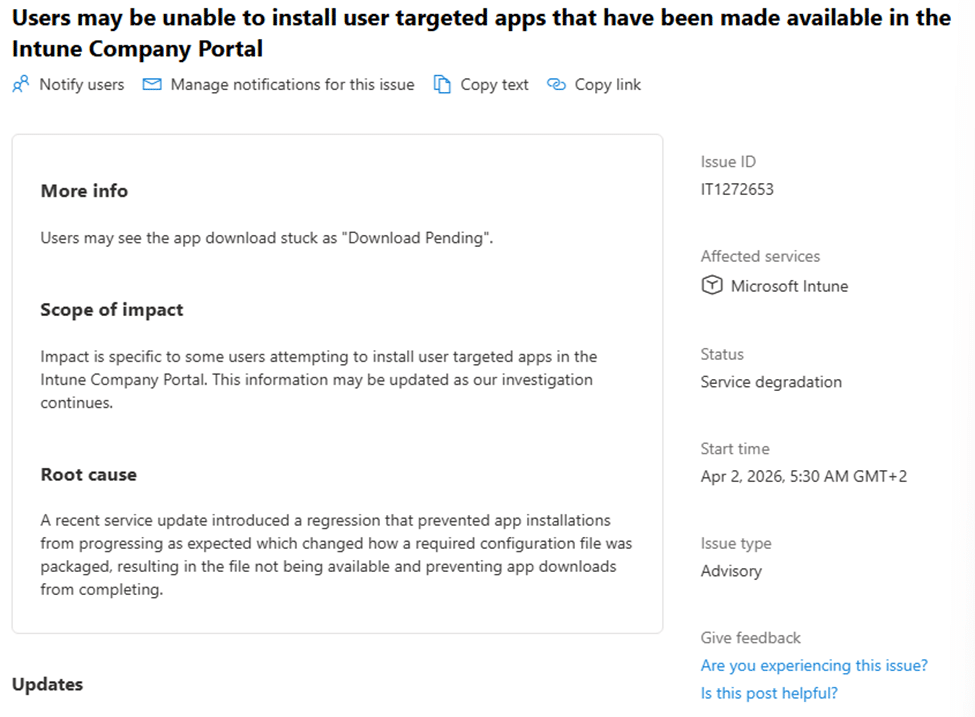
That wording of the IT1272653 incident lines up closely with what showed up in the MSI package and in the upgrade behavior.
The IntuneWindowsAgent.exe.config
In the older IME packages, Microsoft.Management.Services.IntuneWindowsAgent.exe.config didn’t have a version configured.

That matters because Windows Installer treats unversioned files differently from versioned ones. When a file is unversioned, Windows Installer tends to preserve user-modified data rather than blindly overwrite it. Guess what happened if you changed the config file to add verbose logging…
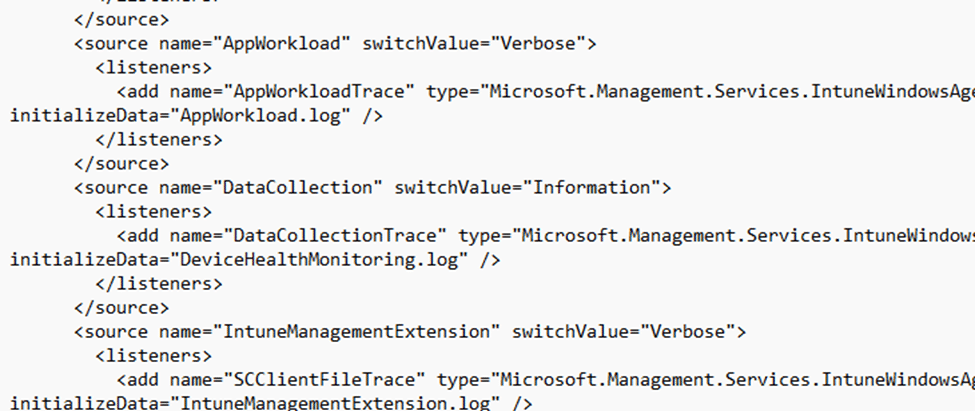
You guessed it… Your own versioned config file will NOT be overwritten when a new IME gets installed. Good to know is that Microsoft’s file versioning rules also state that non-versioned files are treated as user data when the modified date is newer than the creation date.

That old model helps explain the first issue. The agent binaries could move forward while the config stayed behind.
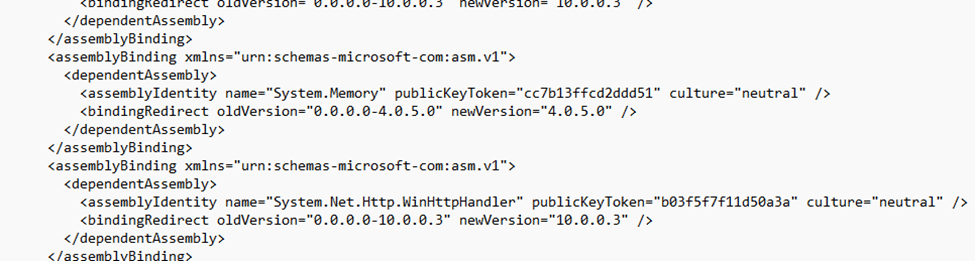
Once the binding redirects no longer matched what was actually on disk, the IME could fail before Company Portal ever had a real chance to start the user app workflow.
What the Intune Management Extension 1.101.103.0 changed
In 1.101.103.0, Microsoft changed that config into a companion file of Microsoft.Management.Services.IntuneWindowsAgent.exe.

In MSI terms, that occurs when the Version field of one file record points to another. Microsoft’s documentation says that when a file is authored that way, the companion parent file controls the versioning logic. The same documentation also states that a file whose KeyPath is that of its component must not be authored as a companion file.

That is exactly the kind of shift that showed up in the 103 MSI export. The config stopped behaving like its own independent tracked file and started following the main Intune Windows Agent EXE instead. At the same time, the component no longer used the config file itself as the KeyPath. In practical terms, Microsoft took the config out of the driver’s seat.
On paper, that makes sense. If the old issue came from a stale config that could outlive the agent version it belonged to, then making the config follow the EXE is a reasonable way to prevent stale binding-redirect drift.
Why 103 caused: IT1272653
Before explaining what happened with the incident: IT1272653… First, I need to make one thing clear: an important detail is that companion files do NOT automatically delete themselves. Microsoft’s file versioning rules say the opposite. If the companion parent on disk and the one being installed have the same version and language, but the companion file is missing, Windows Installer uses the companion file being installed. In other words, companion file logic can help a missing file come back.
So the story is not “Microsoft turned the config into a companion file, and companion files delete themselves.” The more accurate story is that 1.101.103.0 was the first transition from the old standalone model into the new companion model, and that transition happened inside a major upgrade sequence where RemoveExistingProductsstill ran after the new files were installed.

Microsoft’s documentation is very clear on this point: when RemoveExistingProducts is scheduled between InstallExecute and InstallFinalize, the updated files are installed first and the old product is removed afterward. That is the gap where this issue likely happened.
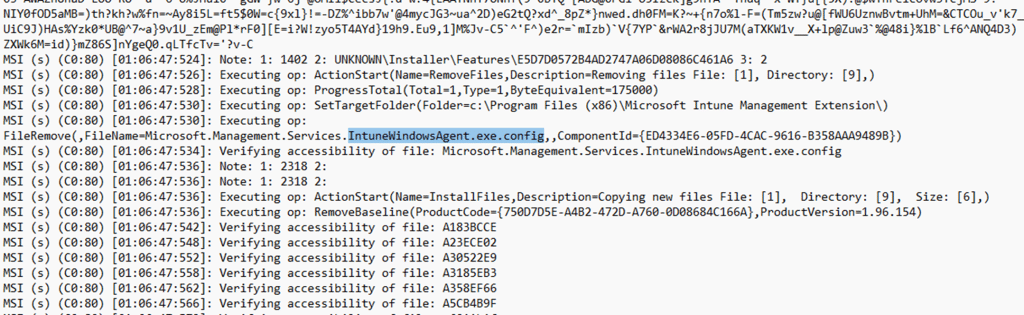
The new 103 package could lay down the config using the new companion model, and then the uninstall phase of the old package could still come in afterward and remove that same config file because the upgrade was crossing from one ownership model into another.

Once that happened, the intunewindowsagent.exe.config file was gone. The new MSI no longer treated the missing config as the key proof that the component was broken in the same way the older package had
Why 105 behaves differently
The reason 1.101.105.0 behaves differently is that by then the machine is already on the companion file model. The first dangerous jump already happened in 103. That matters because the MSI rules now work in 105’s favor. Microsoft documents that if the companion file is missing while the parent file is being installed, the companion file being installed is used even when the parent file version comparison is otherwise equal.

That fits what showed up in the 103 to 105 MSI log. The config was no longer treated like a normal unversioned file with its own hash-based overwrite decision.

It was processed through the companion relationship to Microsoft.Management.Services.IntuneWindowsAgent.exe, which means 105 could refresh or recreate the config precisely because the companion model was already in place by then. So 103 appears to be the version that introduced the Win32 companion model and hit the ugly transition problem. 105 appears to be the version that benefits from the companion rules instead of colliding with them.
So what did 105 fix???
Based on what I could verify, 105 did two different things at the same time, but only one of them is clearly visible in the code. The first part is the APDP / APv2 provisioning hardening. That is visible in EmsAgentService and looks deliberate. The service restart and provisioning resume path is cleaner in 105, and the guard logic is better contained.
The second part is the config recovery effect. Because the system is already on the companion model after 103, and because companion file rules allow a missing companion file to be laid down when the parent file is being installed, 105 can recreate the config that 103 left missing.

That does not require Microsoft to abandon the companion model. In fact, it is the companion model that now lets the missing config come back.
-IME 103 introduced the new companion model and removed the config file
-IME 105 kept the new model, fixed the APDP side, and, because the config was already missing, could now put it back down using the normal companion rules.
IT1272653: Summary
Microsoft needed a way to solve the original IME config versioning problem, where an old Microsoft.Management.Services.IntuneWindowsAgent.exe.config could survive an upgrade and no longer match the binaries next to it. In 1.101.103.0, they changed that file into a companion file of Microsoft.Management.Services.IntuneWindowsAgent.exe, but that first jump into the new model appears to be where the config could disappear during upgrade. In 1.101.105.0, the companion model stayed in place; the missing config could be recreated… with it, the IME started working again.