The new Secure Boot Status report in Intune finally provides visibility into Secure Boot state across all of your devices. This new Secure Boot Status Report will become the first place to look once the Secure Boot policy is in place. What it does not explain is where that Secure Boot info actually comes from.
And that’s exactly what this blog is about… Showing you where that Secure Boot Information comes from and who is responsible for it.
The Secure Boot Status Report
Once you have configured the Secure Boot policy to ensure the Secure Boot Certificate will be updated, the Secure Boot Status report is the place to find out what happened.
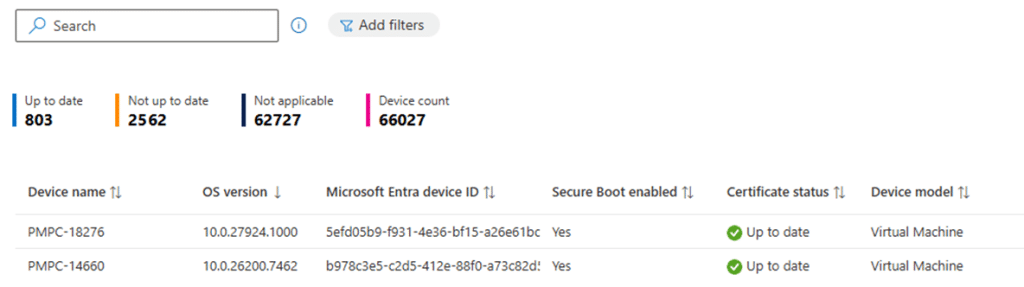
Not only because something could have gone wrong (policy rejected by licensing), but also because that report finally promises visibility. It shows all the Secure Boot Info you need. The Secure Boot report indicates whether systems are considered ready, and provides a sense of Secure Boot Certificate update progress without touching individual machines.
At first glance, it feels like a familiar reporting experience. Devices appear, values populate, and the data looks authoritative. The report gives you the impression that Secure Boot is being actively observed and evaluated on every device. What it does not explain is how that Secure Boot Info got there. . That gap is where my investigation started
Finding the Secure Boot Info Collector
Because the Secure Boot Report is surfaced through Autopatch, the first assumption is an easy one to make.

If Autopatch exposes the Secure Boot Status report, the Autopatch broker agent, must collect the Secure Boot Info locally and send it upstream??? That theory made sense until I actually examined the Autopatch agent with the dotpeek tool.
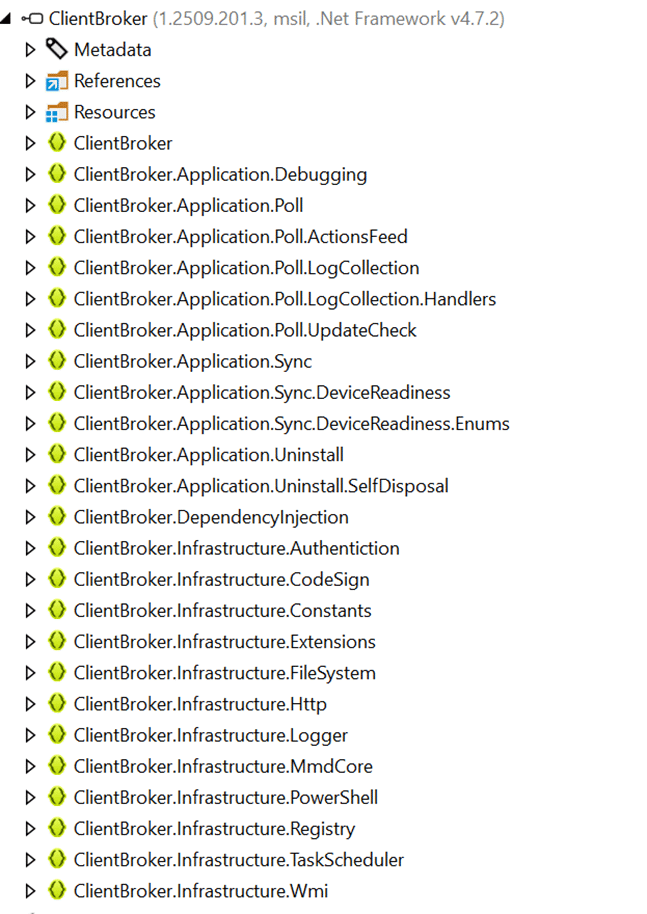
The Autopatch broker does not evaluate firmware state. It does not query Secure Boot. It does not interact with the TPM.
With that option ruled out, the next hope was enhanced device inventory. Secure Boot feels like classic hardware-backed device information. If anything were going to expose firmware trust state, this would be the feature to do it…. But Secure Boot Info is not there as well. There is no visibility into Secure Boot readiness, no signal indicating eligibility, and nothing that maps cleanly to what the Secure Boot Status report shows. At that point, every familiar data collection mechanism has been exhausted. There is really no fancy agent fetching this data.
If No Agent Can Fetch It, Windows Must Be Doing It
With the obvious agents not the ones fetching the secure boot status report data, it was time to move on. One thing is obvious… If Secure Boot state is being evaluated correctly and consistently reported, then the component responsible for Secure Boot Servicing itself must be involved. That realization leads directly to the PI Secure-Boot-Update scheduled task. (which is executed every 12 hours)

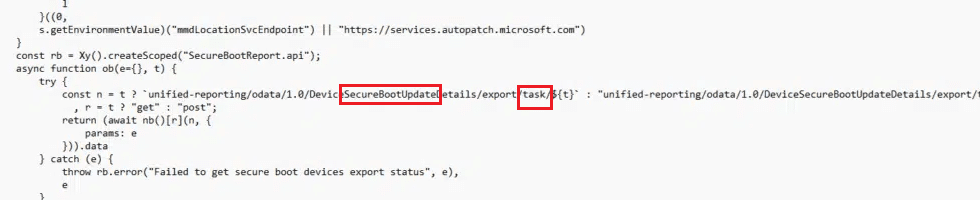
This Secure Boot Update task is invoked whenever Windows evaluates or applies Secure Boot updates. If any component in the system understands Secure Boot well enough to report on it, that understanding would live here… and, looking back at the Intune Portal code, I guess it was all in the name?
Following the Secure-Boot-Update Task
Running the PI Secure-Boot-Update task does not immediately result in firmware changes. Instead, it triggers a servicing flow that loads TpmTasks.dll. That detail matters.
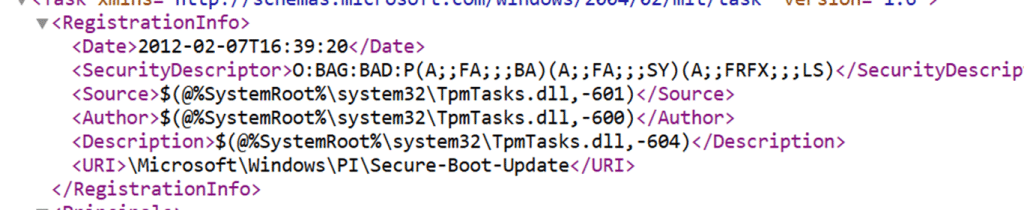
TpmTasks.dll is not a generic update component. It is the same library Windows uses for TPM-backed servicing and (device health) attestation-related operations. Secure Boot, measured boot, and platform trust all cross paths here. At that point, the investigation shifts from the scheduled task itself to what happens inside that tpmtasks DLL file.
Send Secure Boot Info
The initial question was simple. How does the Secure Boot Status report get its data? Opening TpmTasks.dll initially answered a different question. It shows that Secure Boot servicing is not a single action, but a complete secure boot update and reporting pipeline. Almost immediately, one function stood out: SendSecureBootInfo

The name (SendSecureBootInfo) alone changes the direction of the investigation. This function is explicitly about sending Secure Boot Info to somewhere.
Finding that function early in the secure boot servicing path makes one thing clear. The Secure Boot update task is not ONLY just responsible for applying the secure boot updates in the first place but it is also responsible for gathering Secure Boot state and reporting it. That realization is what makes it worth continuing deeper into the servicing logic.
Secure Boot Servicing Starts by Understanding the Device
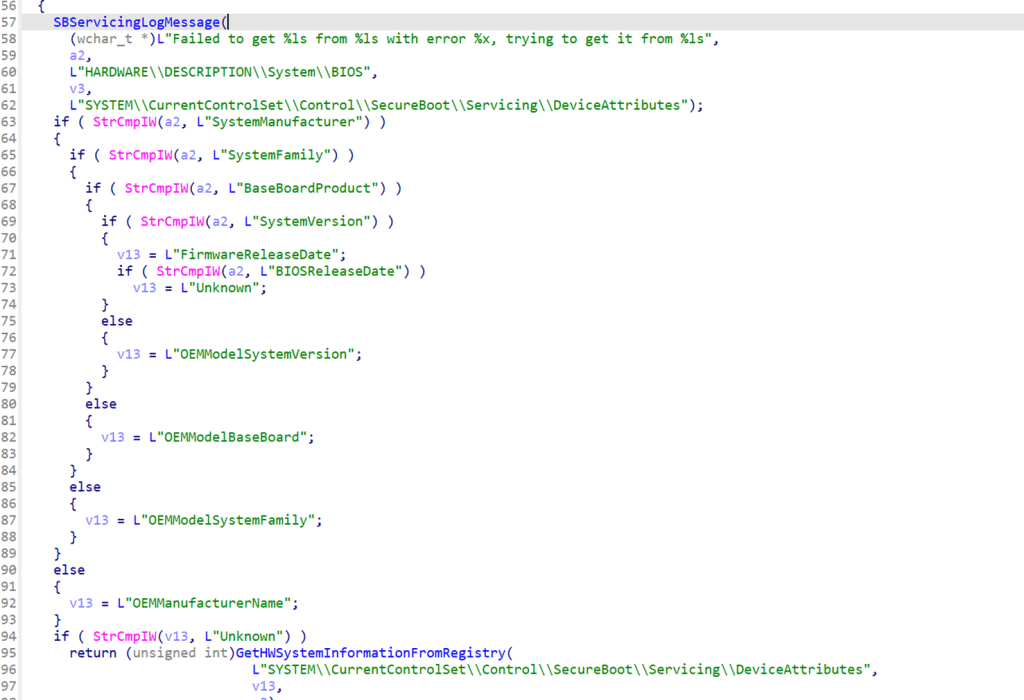
Before Windows even considers applying a Secure Boot update, it evaluates the device it is running on. Manufacturer, baseboard product, firmware characteristics, and architecture are read directly from the system.
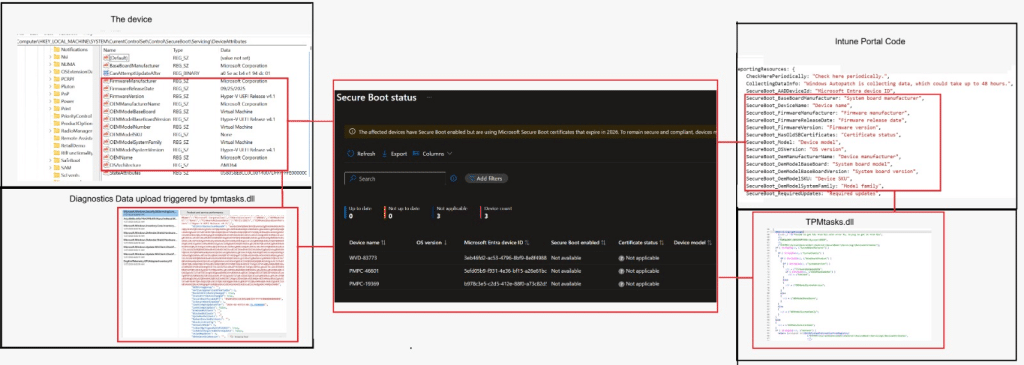
Which we could also spot in the registry as well… The best thing? We can match that Secure Boot Info 1:1 with what we see in the Secure Boot status report.
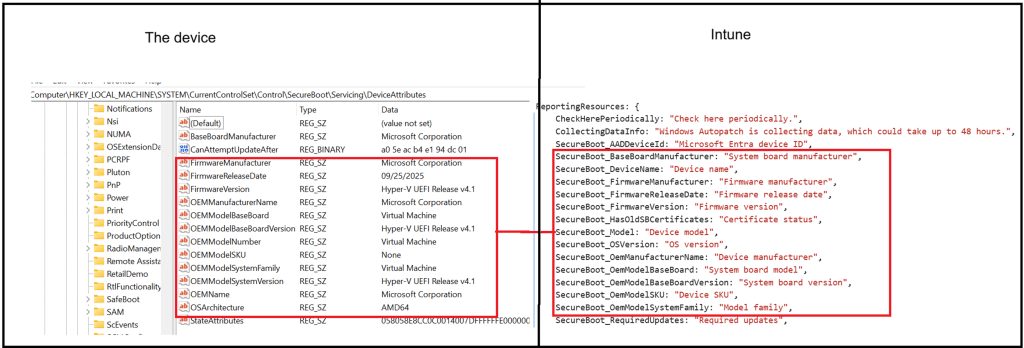
This is not only about visibility. This information determines whether Secure Boot updates are safe to attempt at all. Certain platforms are deliberately excluded. Others require guarded handling. Those decisions are embedded directly in the servicing logic. Only once the platform context is established does Windows move on to Secure Boot itself.
Secure Boot Is Evaluated Explicitly
The Secure Boot state report is not inferred from the policy. It is read directly from the system-maintained Secure Boot state. Windows asks the platform whether Secure Boot is enabled and records the answer.
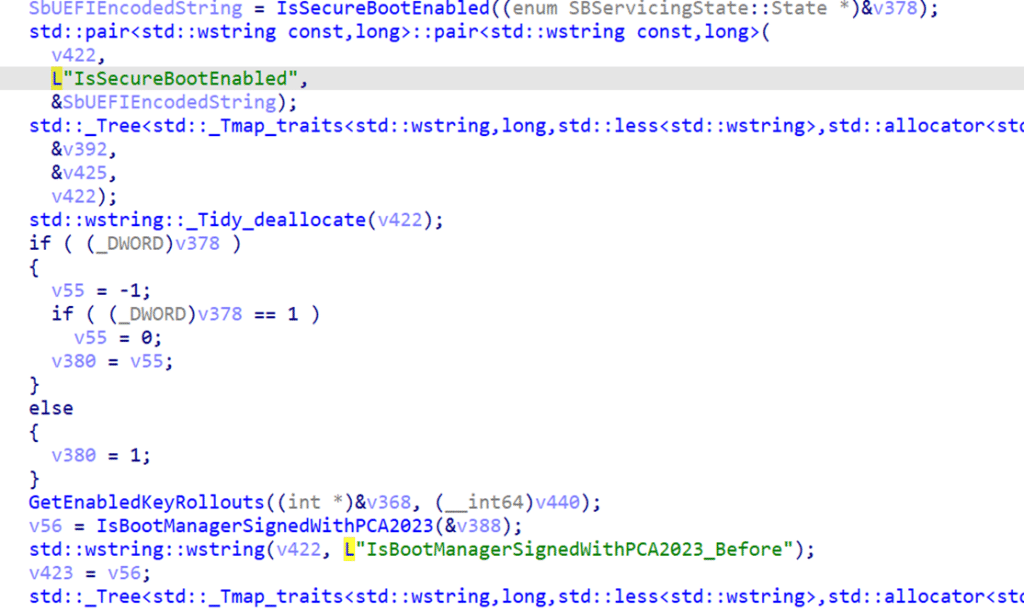
That result becomes a core input for everything that follows. It influences whether updates are allowed, deferred, or skipped entirely. This is also where the TPM worker comes into play. The servicing flow runs inside a worker context that already exists for TPM-backed operations. Secure Boot evaluation fits naturally into that model because it relies on the same trust assumptions.
Diagnostic Data to the rescue
If the secure-boot-status task has gathered all required secure boot info, it will initiate the servicing flow to prepare the data for reporting. That diagnostic data payload is then sent using SBServicingCoreTelemetryProvider::SendSecureBootInfo. The data is not sent to Intune, and it is not sent to Autopatch directly. It is emitted as Windows Secure Boot servicing telemetry/diagnostic data and flows through the Windows Update servicing pipeline into Windows Update for Business reporting.

If we zoom into what that Secure-boot-update tasks send over, it all starts making sense.
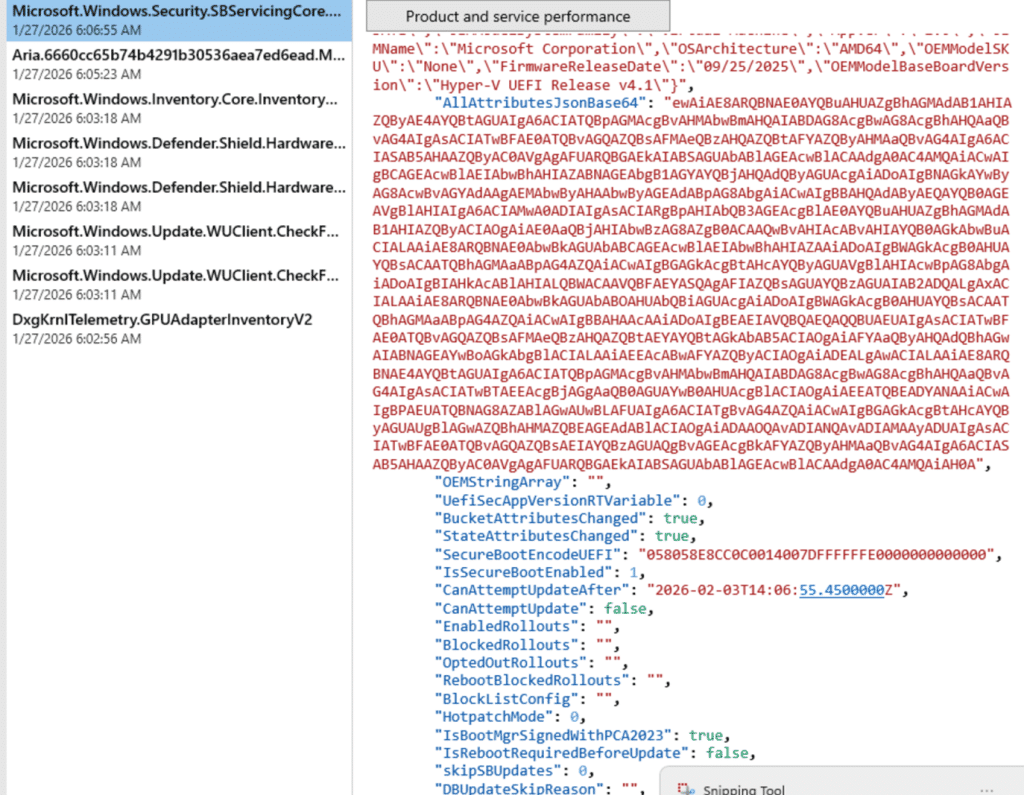
As shown above, when we kick off that Secure Boot Update Scheduled task, Windows Diagnostics Data sends all Diagnostic Data (which includes the Secure Boot Info) to Microsoft. So I guess we need to ensure we share our Windows Diagnostic data with Intune.
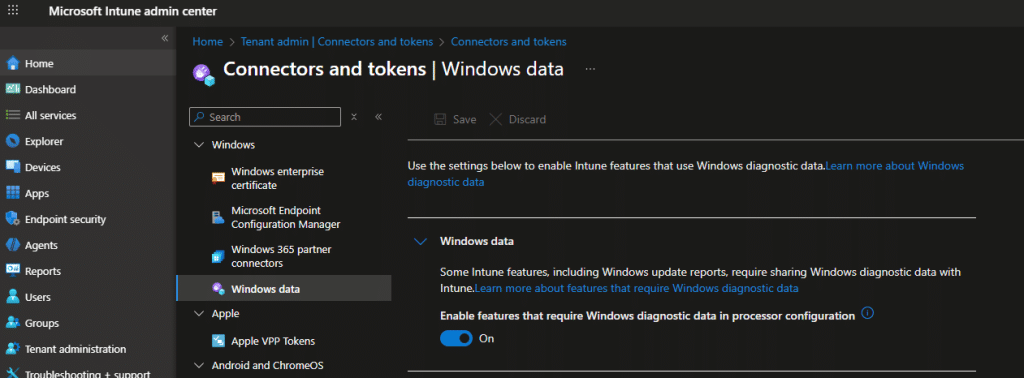
From there on, Autopatch consumes that Diagnostic Data, and Intune simply renders it. Intune is the viewer, not the collector.
Reading the Secure Boot Status Report for What It Really Is
Once this diagnostic data flow is clear, the Secure Boot Status report becomes much easier to interpret. It is neither a policy compliance report nor an inventory snapshot. Windows is telling you what it found when it evaluated Secure Boot on the device.
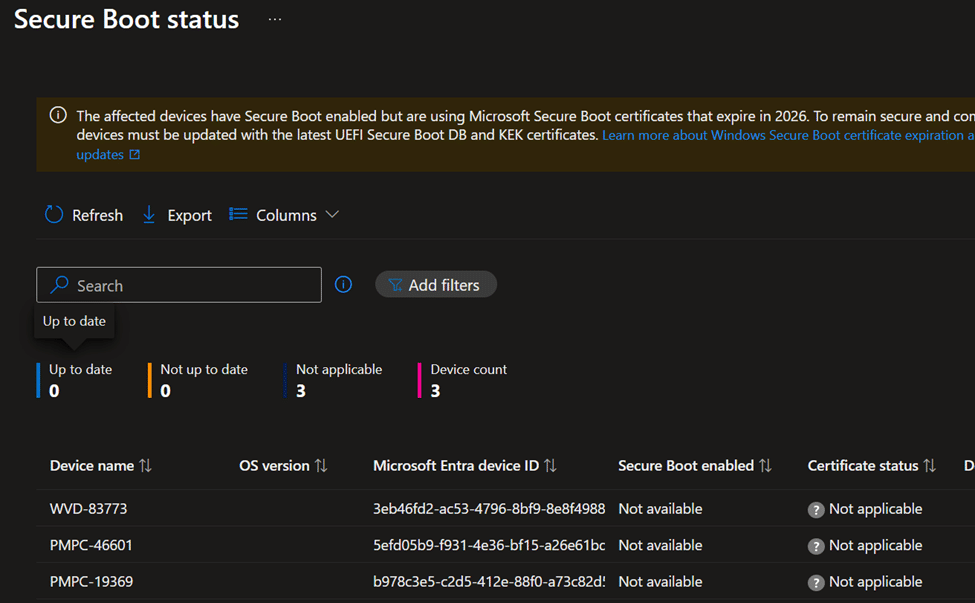
That is why this secure boot report is the right place to look once the policy is applied. It shows you the device through the eyes of the servicing engine that actually enforces Secure Boot.
Conclusion
The Secure Boot Status report is not magic, and it is not Intune intelligence. It is just Windows reporting the outcome of its own Secure Boot servicing logic. The Secure Boot Update task does the work, TpmTasks.dll evaluates the platform, and Windows Update telemetry carries the result upstream. What you see in Intune is simply the rendering of that servicing truth, nothing more and nothing less.