
Microsoft recently added support for PowerShell Script Installer inside Win32 apps in Intune, including a 32-bit and 64-bit execution switch. On paper, that switch promises full control over the PowerShell architecture used during installation. In reality, in the Intune Management Extension, the 64-bit option still launches 32-bit PowerShell.
Please note: Intune Engineering implemented the fix in 1.101.103.0 IME version
PowerShell Script Installer Support
Intune recently gained a powerful capability: support for PowerShell installer scripts in Win32 apps, as documented in our deep-dive on PowerShell Script Installer Support for Win32 Apps in Intune.
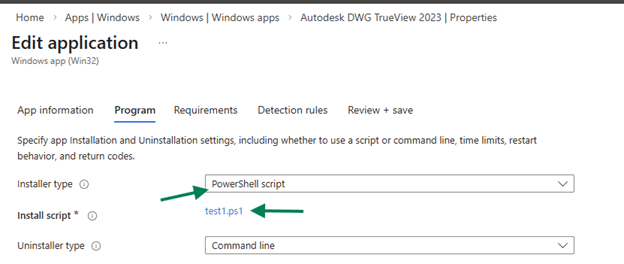
This new Win32App feature includes a user-visible switch to run the script in 32-bit or 64-bit PowerShell, giving administrators control over the execution architecture of their install logic.
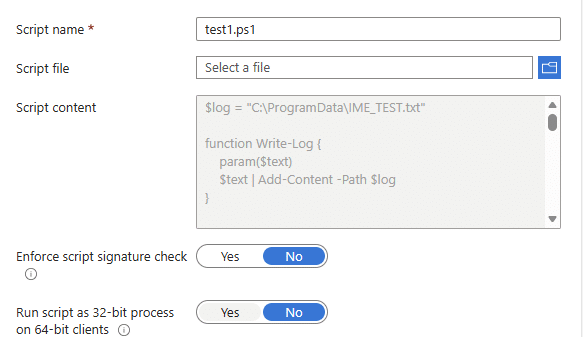
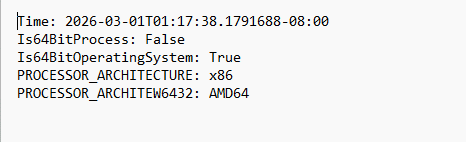
However, in practice, that switch doesn’t behave the way people expect. Even when the Win32 app policy is configured with the 64-bit option enabled, the installer script still launches under 32-bit PowerShell inside the Intune Management Extension (IME). This is clearly visible when Procmon is running.
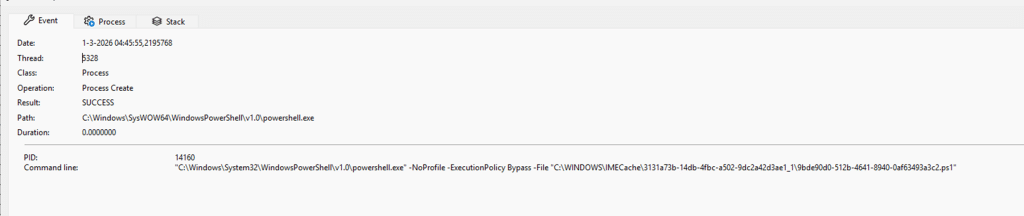
The main problem isn’t that the UI switch is invalid or that the installer script logic builds the wrong command line, the IME code resolves the registry paths correctly, and the command string references System32\WindowsPowerShell.
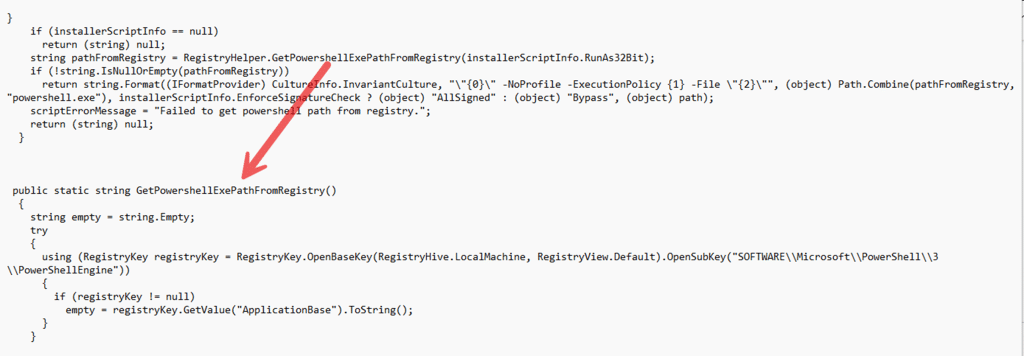
The missing piece is how the process is actually launched under the hood. This became clear when comparing the installer script path with how Microsoft already handles architecture in the PowerShell AgentExecutor, which does properly honor the 32-bit / 64-bit preference by managing Windows file system redirection at the right point.
What Really Happens Inside IME
The Intune Management Extension runs as a 32-bit process on 64-bit Windows.
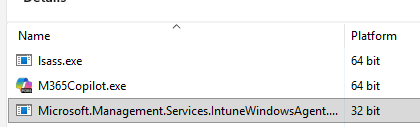
Whenever a 32-bit process attempts to access C:\Windows\System32, Windows automatically redirects that request to C:\Windows\SysWOW64. This redirection happens transparently and is designed to preserve compatibility for 32-bit applications running on 64-bit systems. So even when IME constructs a command line that clearly points to the System32 version of PowerShell, Windows intercepts the request and reroutes it to the 32 bit binary under SysWOW64.
The IME process believes it is starting the correct executable, but the operating system quietly substitutes it. The important detail is that this substitution happens at process creation time, not at string construction time. Therefore, changing registry paths or modifying command line strings alone does not prevent redirection.
Why the 64 Bit Toggle Does Not Work for the Script Installer
When the Win32 app installer logic builds the PowerShell command line, it correctly queries the registry to determine the appropriate PowerShell path based on the RunAs32Bit flag. If the flag indicates 64-bit execution, it resolves the System32 path. On paper, that logic is correct.
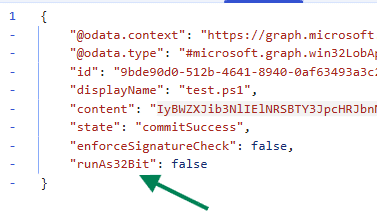
The issue appears later in the flow when LaunchInstaller ultimately calls CreateProcess or CreateProcessAsUser.
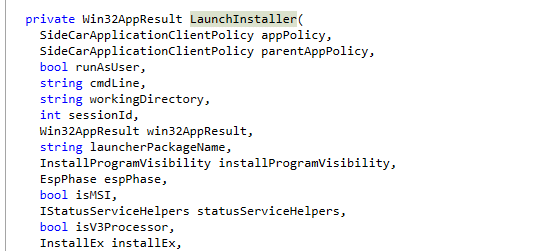
At that moment, because IME itself is a 32-bit process, Windows applies WOW64 file system redirection unless it is explicitly disabled.

Since the Win32 installer implementation does not disable redirection before creating the process, the request to start the System32 PowerShell executable is silently redirected to SysWOW64. As a result, the script installer 64-bit toggle changes the resolved path but never alters the execution context. The system still launches 32-bit PowerShell because redirection remains active.
How Microsoft Solved This in the PowerShell Executor
Interestingly, Microsoft already addressed this exact scenario in the PowerShell execution component located in Microsoft.Management.Services.IntuneWindowsAgent.AgentExecutor.PowershellExecutor. In the Run2 method, before starting the PowerShell process, the code calls Wow64DisableWow64FsRedirection.

That API temporarily disables file system redirection for the current thread. With redirection disabled, a request to C:\Windows\System32\WindowsPowerShell\v1.0\powershell.exe is honored exactly as written. After the process is created, the code restores the original state using Wow64RevertWow64FsRedirection.
This Wow64RevertWow64FsRedirection. makes sure a 32 bit host can temporarily stop Windows from redirecting System32 to SysWOW64, so the real 64 bit PowerShell actually starts. That is why normal Intune PowerShell scripts truly run in the 32-bit or 64-bit mode you selected.
What Was Missed in the New Installer Script Implementation
When PowerShell installer script support was added to the Win32 app plug-in, the implementation reused parts of the command line construction logic, but did NOT replicate the redirection handling from the PowerShell executor. The flow works as intended, and the command line reflects the desired architecture, yet the crucial step of disabling WOW64 redirection was omitted.
Because that API call is missing, the execution still occurs within the redirected environment of the 32-bit IME process. The switch appears functional from a configuration perspective, but the underlying process launch does not enforce the architecture choice at the operating system level.
Why This Matters
Running a script under 32-bit PowerShell instead of 64-bit PowerShell is not a minor variation. Registry access behaves differently because 32-bit processes are redirected to WOW6432Node under HKLM\Software. File system paths may resolve differently, and certain modules or COM registrations might only exist in the 64-bit context.
This mismatch can lead to subtle installation failures or detection inconsistencies that are difficult to diagnose because the configuration seems correct. Administrators trust the 64-bit toggle, but the execution environment does not honor it.
How Microsoft Could Easily fix this
The correction mirrors what is already implemented in PowershellExecutor.Run2. Before invoking CreateProcess or CreateProcessAsUser inside LaunchInstaller, the code must check whether the operating system is 64-bit and whether the current process is 32-bit. If those conditions are met and the installer script is intended to run in 64-bit mode, it should call Wow64DisableWow64FsRedirection before creating the process.
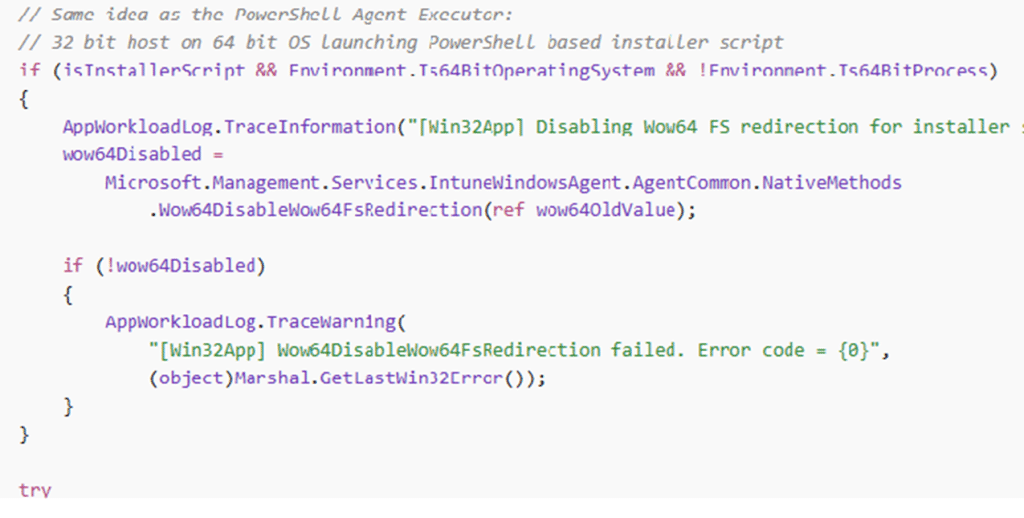
After the process has been created, the code should restore the previous state using Wow64RevertWow64FsRedirection inside a finally block. This ensures that redirection is disabled only for that specific launch and immediately re-enabled afterward.
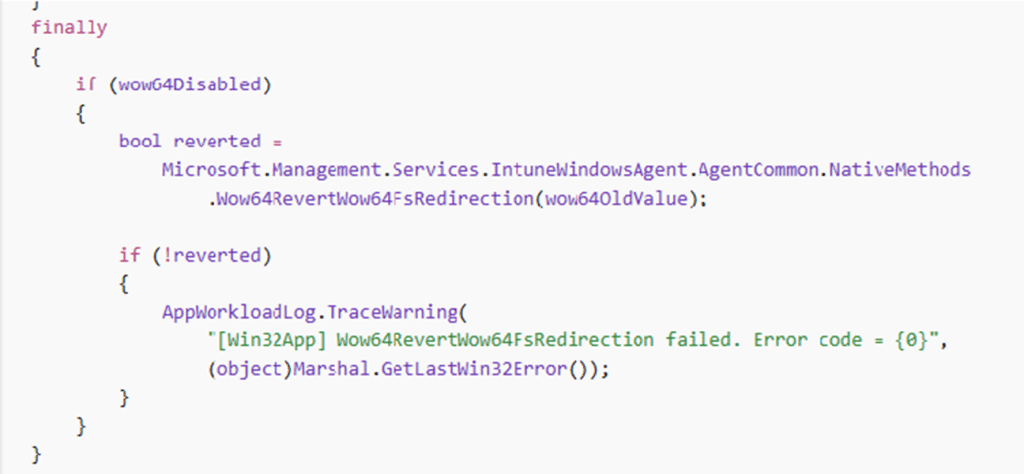
With that change in place, the System32 path is no longer rewritten to SysWOW64 during process creation, and the installer script genuinely runs under the 64-bit PowerShell host as intended.
Microsoft fixed it!
By the looks of it, Microsoft sent out a new IME version: 1.101.103.0
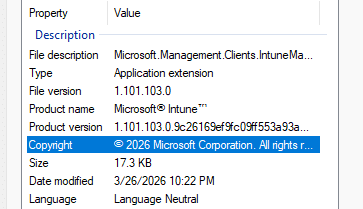
So I couldn’t help myself to start looking at the IME and, to be precise, the Launchinstaller Function Inside the Win32AppInstaller

Once I opened that LaunchInstaller function, I immediately spotted a big change inside that code: DisableWow64FXredirection
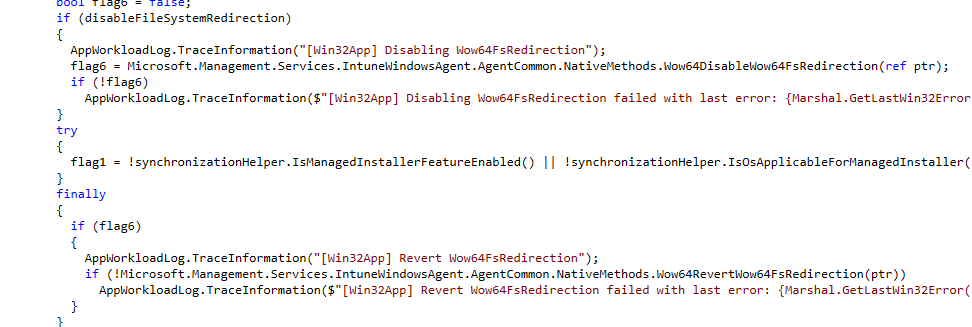
Looks like Microsoft/Intune Engineering listened to my advice (just kidding… I think?) and added the same fix I would have. Please Note: I still need to test it, but by the looks of it… it is fixed with the new IME update.
How We Could Fix It when it Happens Again
With Microsoft still needing to fix this WOW64 issue, if something like this happens again in the future, we can always fix it ourselves. Fixing it is pretty easy; just add this at the top of your PowerShell script to ensure PowerShell is relaunched as 64-bit.
# Relaunch in 64 bit PowerShell when running under 32 bit host
if ($env:PROCESSOR_ARCHITECTURE -eq "x86" -and $env:PROCESSOR_ARCHITEW6432)
{
    $ps64 = Join-Path $env:WINDIR "SysNative\WindowsPowerShell\v1.0\powershell.exe"
    if (Test-Path $ps64)
    {
        & $ps64 -NoProfile -ExecutionPolicy Bypass -File $PSCommandPath
        exit $LASTEXITCODE
    }
}
The Core Problem
The registry lookup logic is correct. The command line construction is correct. The configuration toggle is exposed and stored correctly. The missing piece is the temporary suspension of WOW64 file system redirection at the moment the process is created.

The PowerShell executor includes that safeguard. The newer Win32 installer script implementation does not. The result is not a broken switch in the user interface but an incomplete implementation at the process creation layer, where Windows ultimately decides which binary is executed.