
After installing the latest Windows Defender Update, the Defender setting IntelTDTEnabled suddenly stops working. Intune reports the familiar 65000 error, while the device logs reveal the real cause: 0x86000002 (specific node does NOT exist), meaning the CSP node is no longer supported. What looks like a normal policy failure turns out to be a configuration endpoint that quietly disappeared from Windows.
Introduction
For a long time, Intel Threat Detection Technology (Intel TDT) was one of those interesting features sitting quietly in the background of Microsoft Defender. It promised hardware-assisted threat detection using CPU telemetry, something that sounded both powerful and slightly mysterious.
In practice, it mostly stayed invisible unless you went looking for it. Recently, that changed…. Just a bit…While investigating Defender configuration behavior, something unexpected surfaced: the Intune Policy used to control Intel TDT suddenly stopped working after the latest Windows Defender KB2267602 Update.
At first glance, it looked like a normal Intune policy failure. After digging deeper, it became clear that something more fundamental had changed inside the Defender agent. Before looking at the 0x86000002 failure, it helps to understand what Intel TDT actually is.
What Intel Threat Detection (Intel TDT) Technology Does
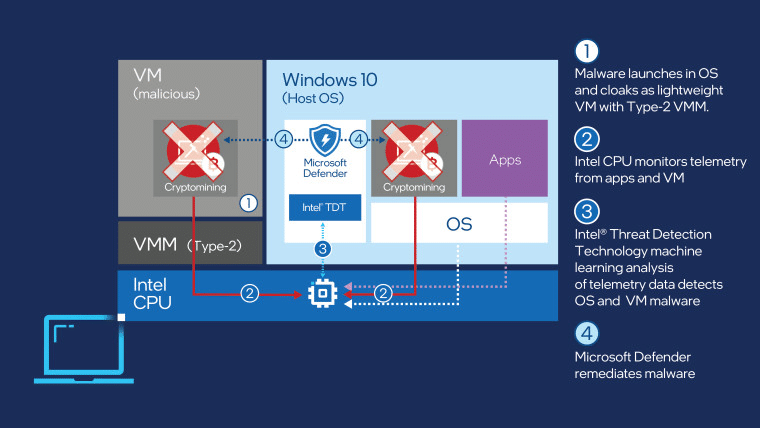
Intel TDT is a hardware-assisted detection capability built into certain Intel CPUs. Instead of relying purely on software signals, Defender can use CPU performance telemetry to detect suspicious behavior patterns. Typical examples include cryptomining workloads or encryption patterns associated with ransomware.
The idea is simple: malicious activity often produces very specific CPU instruction patterns. Intel exposes those patterns through hardware telemetry, and Defender can analyze them with machine learning models. When supported hardware is present, Defender can use this signal alongside its normal protection layers, such as behavioral monitoring, cloud intelligence, and attack surface reduction. In most environments, this feature does not require manual configuration. When supported hardware is present and Defender is running, the Intel TDT integration activates automatically.
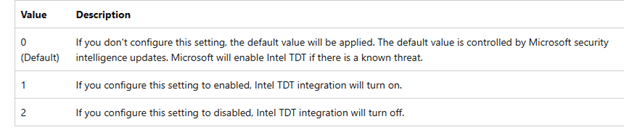
However, Windows also exposed a configuration switch that allows administrators to explicitly enable or disable the feature.
The Intune Policy That Used to Control Intel TDT
Administrators had two main ways to control the feature. The first was a local PowerShell configuration through Defender preferences: Set-MpPreference -IntelTDTEnabled 1

The second was through the Defender MDM configuration CSP (Settings Catalog) used by Intune: ./Device/Vendor/MSFT/Defender/Configuration/IntelTDTEnabled

When configured through Intune, the policy was successfully applied via SyncML through the Defender CSP provider.

The node mapped to the Defender preference model behind the scenes and enabled the hardware telemetry integration.

Which we could also spot in the registry as well
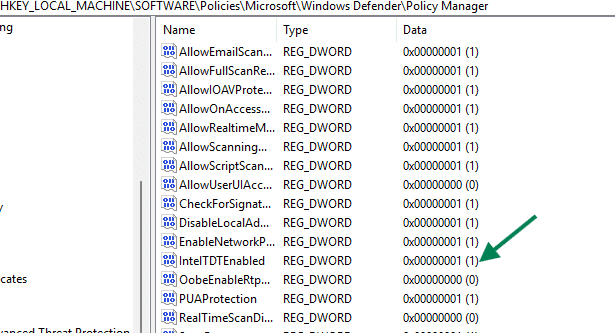
For a long time, this Defender Intel TDT policy worked exactly as expected.
The Policy Works… Until….(0x86000002)
On freshly installed Windows devices, the defender configuration behaves normally. The policy applies successfully, and Defender accepts the Intel TDT configuration. Besides the Intune policy, the PowerShell command also still works as expected. After updating the latest Windows Defender Signatures (Engine Update) twice, something changed.
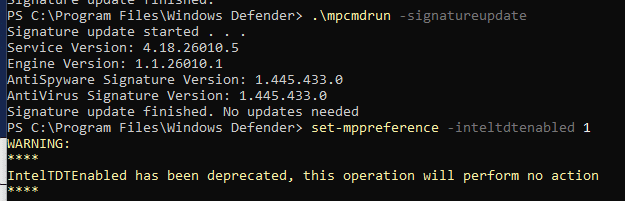
As shown above, the same PowerShell command that previously enabled Intel TDT now reports that the Intel TDT setting has been deprecated.

At the same time, Intune deployments will start failing with the well-known error 65000.

In other scenarios, that same error could be associated with licensing issues (or any other error that Microsoft didn’t map to a proper error code). In this case, it is not. The real error becomes visible when examining the DeviceManagement event logs.
The Actual 0x86000002 Error Behind Intune’s 65000
Inside the DeviceManagement-Enterprise-Diagnostics-Provider log, the event shows the real failure.
Command failure status:
CSP Name: Defender: Command Type: Add
CSP URI: ./Device/Vendor/MSFT/Defender/Configuration/IntelTDTEnabled
Result: Unknown Win32 Error code: 0x86000002

This code originates from the Windows MDM stack and indicates that the requested node doesn’t exist and is no longer supported. In other words, Windows is rejecting the request before it ever reaches the Defender engine.
Testing the CSP Directly
To remove Intune from the equation, the next step was to query the CSP directly through SyncML. Using the local SyncML testing tool, we queried the configuration CSP defender node to find out if the IntelTDT was indeed gone
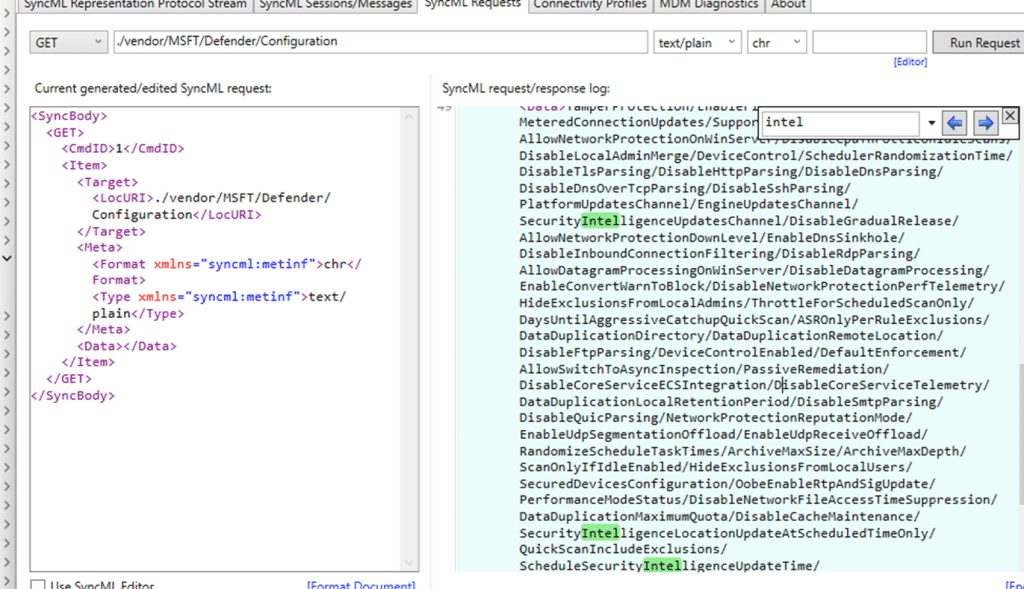
As shown above, the IntelTDTEnabled node no longer exists in the Defender CSP. When performing the same steps on device that did NOT had the latest Defender Updates installed, the Intel TDT node was still there:
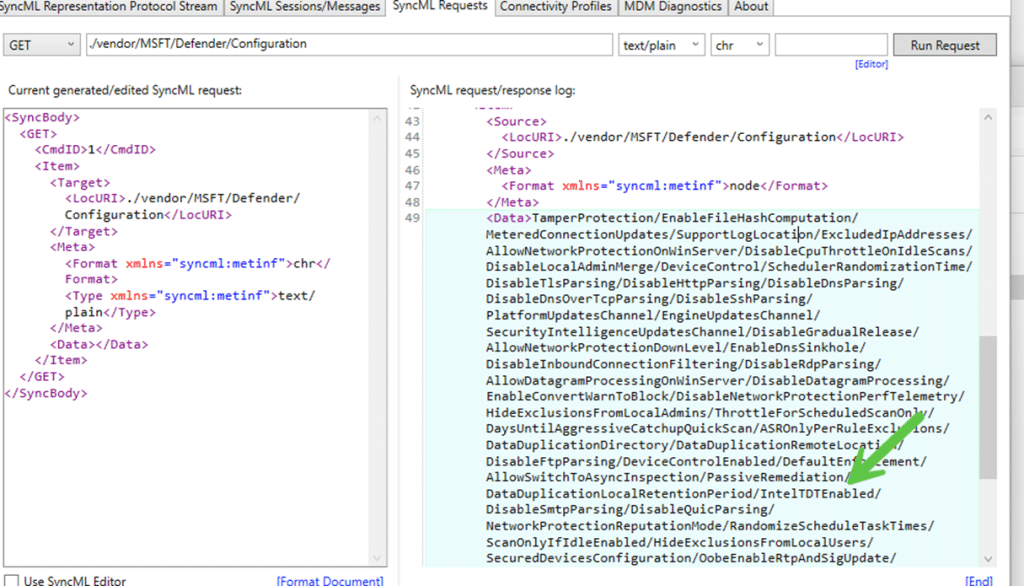
At this point, it was clear that Intune was not the problem. The Intel TDT node itself was being rejected by the Windows MDM stack.
Recreating the Node Manually also got 0x8600002
Just to be certain, the next attempt was to manually add the IntelTDT node and apply the configuration again per the Defender CSP policy.
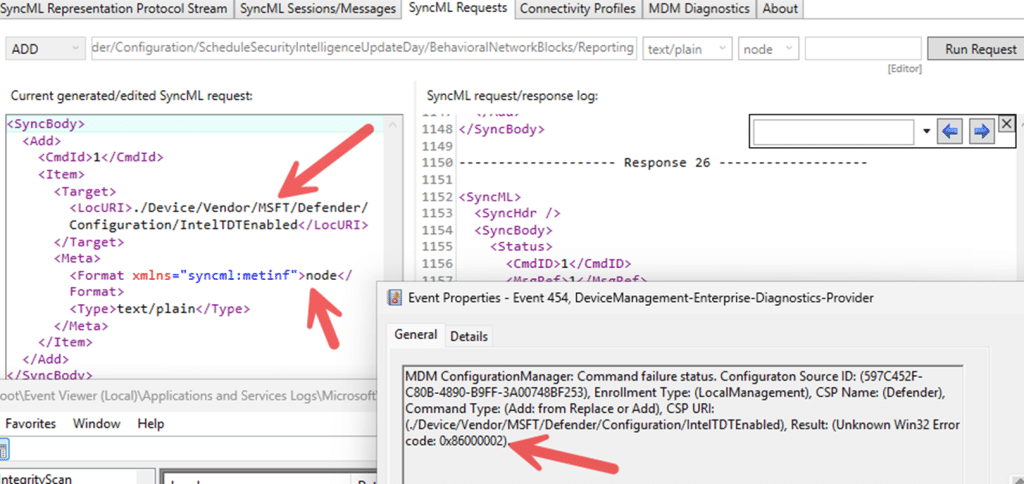
The result was identical to that of Intune. The request failed immediately with the same 0x86000002 error code. If the issue had been caused by missing configuration data or corrupted policy state, recreating the node should have restored the functionality. Instead, the result remained unchanged. Even when manually creating the node, Windows still rejects the request. The node simply no longer exists as a valid configuration endpoint.
Missing Documentation and No Warning in Intune
One thing that makes this change particularly confusing is that there is currently no documentation describing this behavior. (Please Note: I reached out to MSFT: They are aware of the issue.)
The Microsoft Defender CSP documentation still lists the following configuration node: ./Device/Vendor/MSFT/Defender/Configuration/IntelTDTEnabled. Nothing in the documentation indicates that the setting has been deprecated or removed. From the documentation alone, administrators would assume the policy is still valid and supported.
However, systems updated with the latest Defender Updates reject the Intel TDT CSP node completely. Any attempt to configure it through Intune results in the well-known 65000 error. Looking at the device logs reveals the real failure: 0x86000002. This error originates from the Windows MDM stack and means the node is no longer supported by the operating system. At the same time, the Intune portal itself also provides no indication that the feature has been deprecated. So, Microsoft, maybe adding this to start with?

Because the policy can still be configured and assigned. The only visible symptom is the device’s deployment failure. From an administrator’s perspective, this creates an awkward situation:
| What the documentation says | What Windows actually does |
| IntelTDTEnabled is a supported Defender CSP node | Windows rejects the node |
| Policy appears configurable in Intune | Deployment fails |
| No deprecation notice | Error 65000 and 0x86000002 |
Without checking the device logs or testing the CSP directly, it is easy to assume something is wrong with the configuration or the device. In reality, the configuration endpoint itself appears to have been removed or deprecated, while the documentation and management tools have not yet been updated to reflect that change.
Is Intel TDT Deprecated or Just the IntelTDTEnabled Policy?
One interesting detail is that the default value for IntelTDTEnabled now appears to be False.

Attempts to enable it through PowerShell return a deprecation warning while the Defender CSP fails with error 0x86000002. At first glance, that could suggest the Intel TDT integration itself has been removed. However, there is currently no public documentation from Microsoft or Intel confirming that Intel Threat Detection Technology has been deprecated.
The evidence shows that the administrator-controlled setting for Intel TDT is no longer functional. In other words, the configuration interface seems to be deprecated, while the underlying hardware capability may still exist and could be managed internally by Microsoft Defender rather than through an exposed policy setting.
Looking at the Defender engine itself also supports that theory. The mpengine.dll still contains a full TDT agent implementation that initializes the Intel TDT runtime, retrieves CPU information, loads configuration, and prepares telemetry handling. That suggests the Intel TDT component is still present inside Defender. What appears to have changed is the administrator-facing control surface. The IntelTDTEnabled policy can no longer be configured, while the underlying detection capability may still be used internally by the Defender engine.
0x86000002 Summary
After the latest Defender Engine Update, the Defender CSP node IntelTDTEnabled stops working. Intune deployments start failing with error 65000, while the device logs reveal the real cause: 0x86000002, indicating the node is no longer supported. The setting also shows as deprecated when using Set-MpPreference.
The confusing part is that the Defender documentation still lists the node as supported, and Intune still allows the policy to be configured. The result is a policy that appears valid but can no longer be applied because the CSP node has quietly disappeared from Windows.