
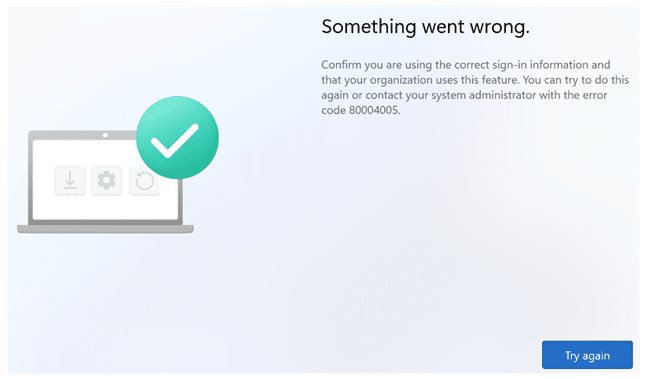
Hybrid Autopilot is already one of those enrollment flows where everything has to line up perfectly. Domain join has to happen at the right moment, the Entra sign in experience must return the right artifacts, and CloudExperienceHost Web App has to glue the whole thing together so the native join engine can actually finish the job. When it breaks (which it does often), it rarely breaks politely… This one ended in the most useless Windows error you can get: Something Went Wrong: 80004005.
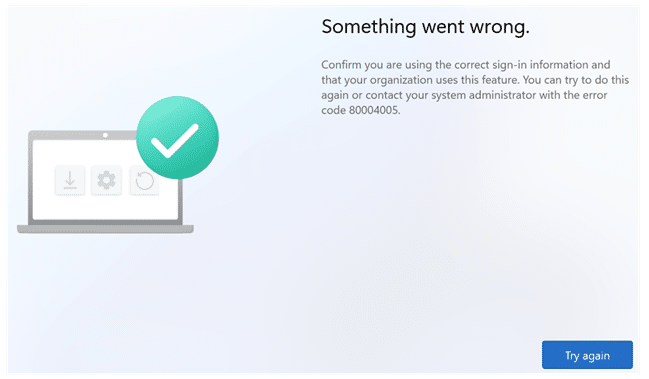
What made it weirder, was that clicking Try Again didn’t just try again. It continued the flow like nothing happened. Even more weirder: pre-provisioning still worked in the same tenant. That’s when it became clear this wasn’t “Autopilot failing”. This was one specific handoff collapsing inside the user driven Hybrid path.
Autopilot 80004005 Errors? Check the Shell Core event log
One thing is for sure, this 80004005 error was no clean “ID token request failed” message. No obvious HTTP failure. No friendly “authentication failed” explanation. The only place that gave me something concrete was the Shell Core event log. And even there, it looked like nonsense at first. The entries kept pointing at: A JSON parsing failure

References to crackIdToken
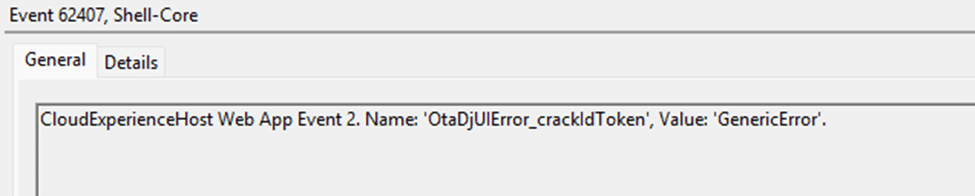
And the one line that mattered most: idTokenNotThreeParts

These are not a normal “login failed” errors. It is beginning to smell like a token structure issue. Windows wasn’t saying “I can’t authenticate.” It was saying: “I tried to treat something as an ID token, and it wasn’t shaped like one.” An ID token is a JWT. A JWT has three sections separated by dots: Header.Payload.Signature.
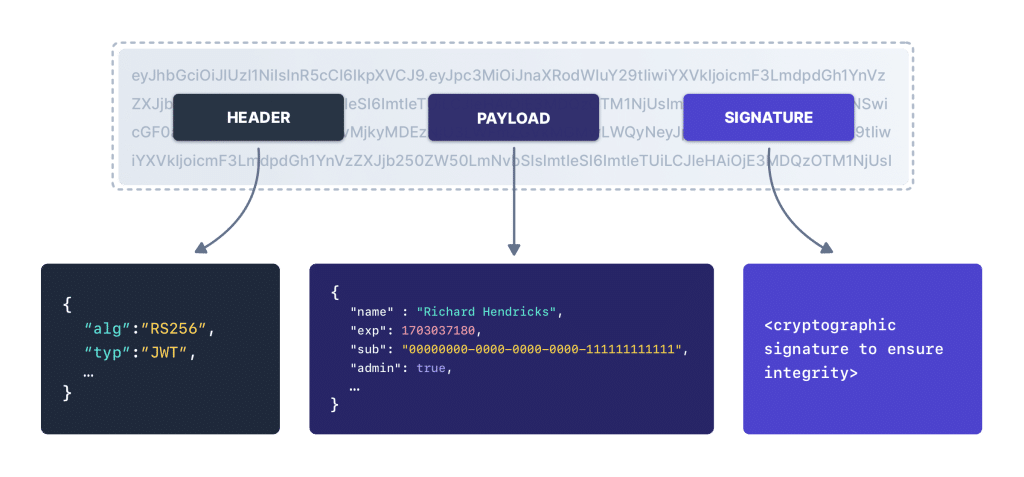
If Windows can’t split the ID token into three parts, it’s not dealing with a “bad token”. It’s dealing with something that isn’t a token anymore, or something that got mixed into the response before it reached the join experience. So the question changed instantly. Not “why did Hybrid Join fail with 80004005?”
But: why did Windows receive something that looked like an ID token, but could not be parsed as one?
The OtaDomainJoin code and the 80004005 error
The Shell Core event log wasn’t vague at all once you look at the stack trace. It points straight into Microsoft’s bundled OtaDomainJoin JavaScript, which is the part of the CloudExperienceHost web layer that takes the ID token and extracts the values the join flow needs.

And that code crashes while doing the most basic JWT work possible.
- It splits the token on dots.
- It base64 decodes the middle part.
- It parses that decoded payload as JSON.
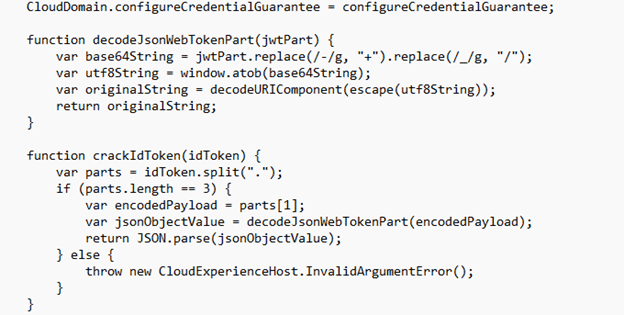
Then it reads claims out of it.

That’s why the Shell Core event log keeps circling around the same helpers. One cracks the token into a JSON object. The other calls it and pulls a specific claim from the parsed result. So, when Shell Core logs idTokenNotThreeParts, it’s not saying “authentication failed”.
It’s saying: OtaDomainJoin expected a clean JWT string, and it received something that no longer had the shape of a JWT at all.
And because this happens before the join worker even gets the full property set, the entire Hybrid token handoff collapses right there. That also explains why the UI makes it look like “the join failed”, while in reality the join never even got the chance to start. The crash happens in the web layer before the worker can continue, at the exact moment the token is supposed to be handed from the Entra sign in flow into the Cloud Domain Join experience.
The OTA Domain Web App Process Auth Flow
So, lets zoom in what should happen when we enter the credentials
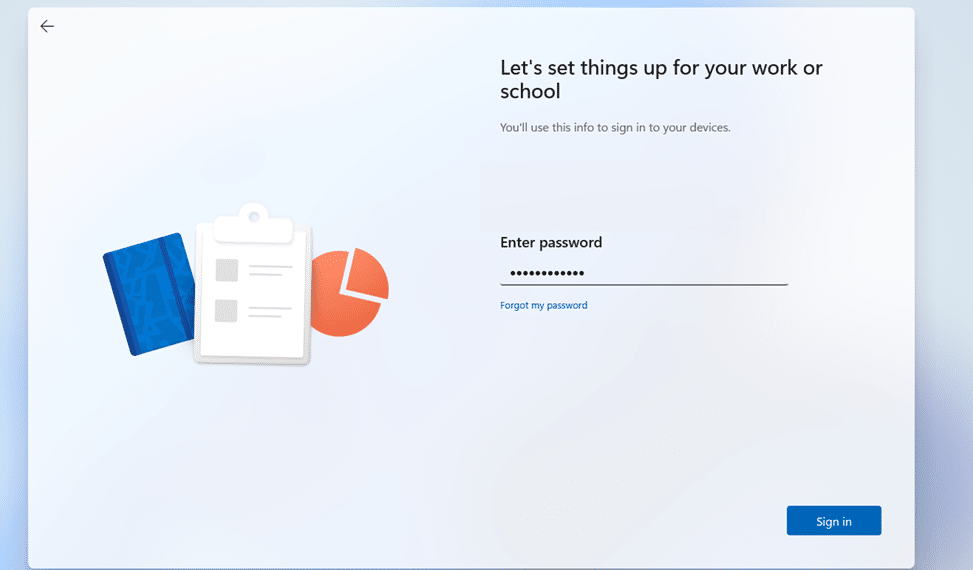
After you enter credentials, the OtaDomainJoin flow doesn’t “just join”. It first has to finish an Entra authentication roundtrip. That’s why you see the classic sequence in the trace: BeginAuth, multiple EndAuth calls (MFA), and finally ProcessAuth. That last one is the important handoff moment.
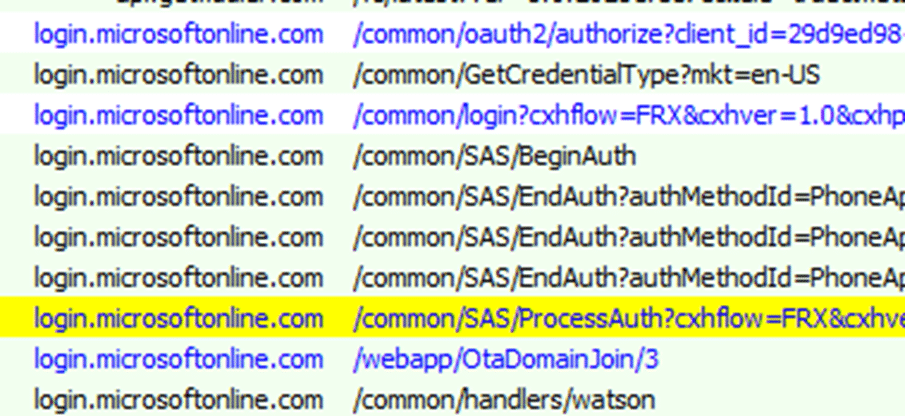
/common/SAS/ProcessAuth is where Entra basically says: “authentication is done, here is the result you need to continue.” In a healthy flow, ProcessAuth does not return a full page that needs to be interpreted by the webapp. Instead, it returns a redirect back into Windows using the ms-aadj-redir:// protocol.

That redirect contains the join continuation data, like the code that represents the completed sign in, plus session_state and the cloud instance hints. The actual “transport” happens in the response headers, not in some giant HTML blob.

That redirect is the bridge between login.microsoftonline.com and the CloudExperienceHost OtaDomainJoin webapp. Once Windows receives that ms-aadj-redir redirect, the CloudExperienceHost side wakes up again and the /webapp/OtaDomainJoin/ experience continues with the authenticated context. At that point TokenBroker and the OtaDomainJoin code can safely pull the id token context, crack the ID token, extract the MDM URLs, build the property set.
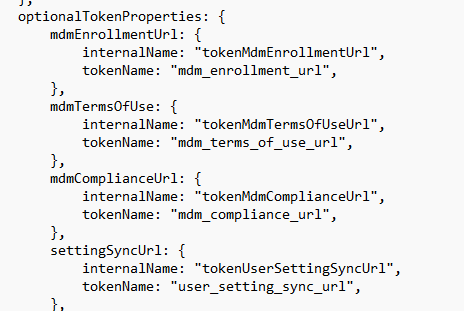
Please Note. When this happens the ID Token is NOT visible in the trace!

Once it’s done, it can finally hand everything to the native join worker to continue the Hybrid Autopilot flow. So, when that ID token can’t be parsed, Hybrid Join doesn’t “fail later”.
It never really starts. The glue layer drops the chain before the worker even gets the inputs (ID token) it needs.
The real failure: the token handoff came back malformed
This was the turning point. When I inspected the broken flow, the response didn’t look like a normal token handoff at all. Instead of a clean redirect, Windows received a full HTML “Working…” page, loaded with script bundles, telemetry config, loaders, and a navigation call to move to the next stage.
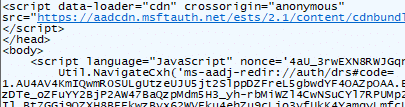
And inside that big weird response, the id_token was visible as part of the payload. (which was NOT malformed!)
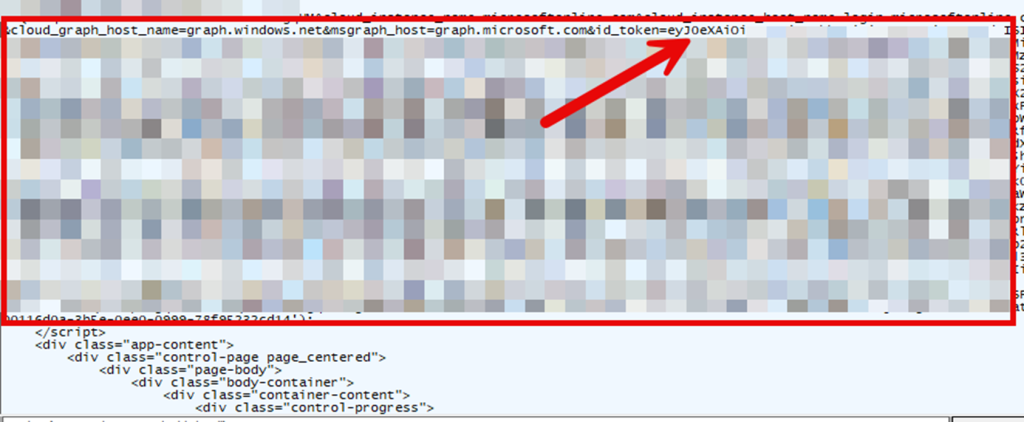
That’s exactly what should not happen in this step. Because this stage is not supposed to “deliver the token inside a page”. It is supposed to hand off a redirect, let the shell pick up the ms-aadj-redir:// URI, and let the OtaDomainJoin consumer receive the token in a strict predictable format.
In the broken flow, it looked like the response that should have been a simple redirect turned into a full page delivery where everything was bundled into one blob. And once you see that, the Shell Core log finally makes sense. If OtaDomainJoin expects a clean JWT string, but instead receives a response where token material is embedded in HTML and script content, then crackIdToken fails immediately.
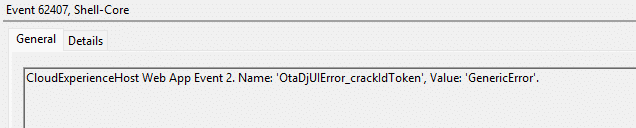
That means the ID token cannot be cracked. Which means the claims inside it cannot be read. Which means the MDM enrollment URL cannot be extracted. The result is exactly what the user sees. A crashed web experience and the fallback error: 80004005
Why pre provisioning didn’t show the 80004005 error
This was the detail that made the whole thing click. In the impacted tenants, Hybrid Autopilot with pre provisioning still worked. Devices could go through the technician flow, ESP could progress, apps installed fine, and the device could be resealed without ever hitting the 80004005 error. Even Microsoft confirmed that behavior!
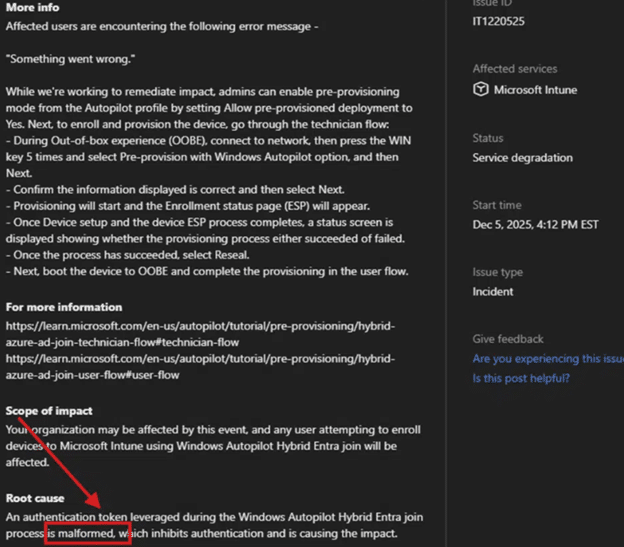
That tells you something important. Autopilot wasn’t broken across the board. The device could still reach the service, still download the profile, and still execute a large part of provisioning. So the failure wasn’t “Hybrid Autopilot is down”. It was tied to one very specific moment: the user driven Hybrid handoff inside OtaDomainJoin, right after the authenticates. During the technician phase, the device isn’t running as the real end user yet. It uses a temporary placeholder user context to move forward, similar to the FooUser style behavior we have seen before.
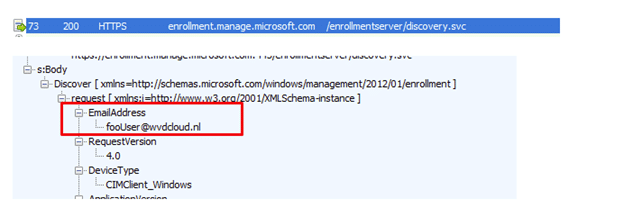
That is why enrolling a device with Autopilot Hybrid pre provisioning can still fetch the “MDM properties” it needs and continue without relying on a fully processed end user ID token callback. In that stage, device identity matters more than user identity. The flow leans on the device proving itself, not on who the user is. The moment the real user signs in, everything changes.
That user driven path is where OtaDJ expects a clean ID token handoff, cracks it open immediately, and extracts routing data like the MDM enrollment URL. If that token handoff is malformed or arrives in the wrong shape, OtaDJ cannot even discover where enrollment should continue. And that is why the flow collapses so early. It dies before it ever reaches the Offline Domain Join blob stage. Same tenant. Same device. Different identity context. Different dependency.
And only one of them requires that strict ID token parsing step to succeed.
Why pressing “Try Again” also fixed the 80004005 error
The funny thing? Clicking “Try Again” at the 80004005-error screen, fixed it as well in some scenarios
Retry worked because the second attempt took a different token path and returned a clean OAuth token response, where the ID token arrived as a proper JWT again.
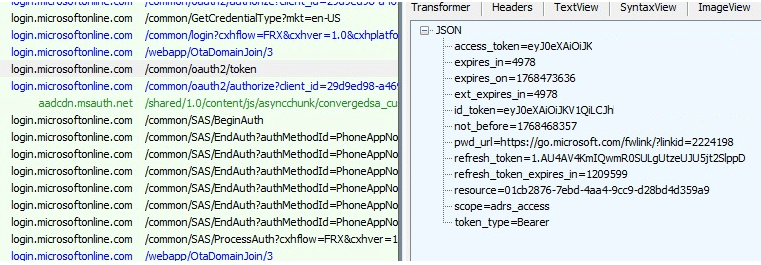
Once the token could be parsed, the MDM URLs could be extracted, the property set was complete, and the native join worker could continue the Autopilot Hybrid enrollment flow normally.
Conclusion
This wasn’t a random Hybrid Join failure, and it definitely wasn’t “just MFA being MFA.”
Authentication succeeded. The device got far enough to request the ID token, but the handoff came back in the wrong shape.
Instead of receiving a clean redirect that the CloudExperienceHost join flow could process, Windows received a full HTML response where the ID token was effectively wrapped inside page content. That broke the crackIdToken step, caused the JSON parse errors (idTokenNotThreeParts), and crashed the Cloud Domain Join web experience into the generic something went wrong 80004005 error screen.